 Pelican
Who needs to do a stocktake?
The short answer: if your business prepares accounts on an accruals basis, which includes every limited company, you need a figure for closing stock at the end of your financial year, and that figure comes from a stocktake. That covers most restaurants, hotels and hospitality businesses that trade as a company. The stocktake is the physical count; the valued result goes into your year-end accounts.
Whether and to what extent this applies to you depends on your legal structure, your size and how your profit is worked out. Sole traders using the simpler cash basis, for example, are treated differently from companies, and the rules in the UK, Ireland and elsewhere are not identical. This is an accounting and tax question, and not one to settle from a guide. Ask your accountant what is required in your case, and as at which date.
Preparation: half the battle
A stocktake is won not on count day, but in the days before. Walk into the walk-in unprepared and you count for twice as long and make twice as many mistakes. This preparation saves the most time:
- Tidy and clear out the store. Anything out of date or spoiled goes beforehand. You only count what you would actually use. A tidy shelf is counted in a fraction of the time.
- Combine opened packs. Two half-used packs of the same item become one. That reduces the number of lines and makes estimating easier.
- Avoid deliveries around the count date. Pick a count day with no major deliveries just before or after. Otherwise you count goods that don't belong in your books yet, or miss something already used.
- Prepare count sheets by storage area. One sheet per storage area, sorted in exactly the order the goods sit on the shelves. Then you count from top to bottom without jumping around.
- Count in pairs. One person counts and calls out, the other writes. That is faster and far less error-prone than one person switching back and forth between goods and sheet.
If your store is already organised with fixed spots, you get this groundwork almost for free. How to set up your store so that the order on the shelf matches the order on the sheet is covered in the guide to restaurant stock management.
Count day in 5 steps
Once the preparation is done, count day follows a fixed pattern. Stick to the order and nothing gets missed:
- One storage area after another, in a fixed order. First the whole dry store, then the walk-in, then the freezer, then drinks and the bar. Never jump between rooms, or you end up counting twice or forgetting a shelf.
- Count and weigh, opened packs included. Whole packs are counted, loose goods are weighed. Opened packs are estimated systematically, for example in tenths: a pack that is a third full is 0.3. Stick to one method and the figures stay comparable from month to month.
- Write it down immediately, don't try to remember. Every number goes straight onto the sheet before you move to the next shelf. Try to remember three lines and you will miscount the fourth.
- Add prices. Each item gets its net purchase price. Multiplied by the quantity, that gives the value of the line. The exact valuation rules, for example when prices fluctuate, are an accounting and tax matter and should be agreed with your accountant.
- Add it up and file it. All line values together give the total value of stock on the count date. Keep the signed sheet. It is your record and, at the same time, the opening stock for the next period.
Stocktake sheet template to download
So you don't have to start from scratch, we have built a stocktake sheet template made for hospitality. Excel for counting and calculating digitally, PDF for printing and taking into the walk-in.
Free, no sign-up, no email address. You are welcome to adapt both files and share them within your business.
This is how the template is structured. Each row is one line, and the columns take you from storage area to value:
| Storage area | Category | Item | Unit | Quantity | Unit cost ex VAT | Value |
|---|---|---|---|---|---|---|
| Walk-in | Dairy & eggs | Double cream | Litre | 14 | €2.30 | €32.20 |
| Walk-in | Meat | Beef fillet | kg | 6.5 | €39.00 | €253.50 |
| Dry store | Dry goods | Strong white flour | Sack | 4 | €18.50 | €74.00 |
| Freezer | Fish | Salmon fillet | kg | 8 | €24.00 | €192.00 |
Why sort by storage area rather than alphabetically? Because that is how you count, walking through the building. You finish one room, then the next. You still need the category, though, because that is how you analyse the results at the end and compare them with your order volume in the same category.
Stocktake, food cost and ordering: how they connect
The stocktake is not an end in itself. It delivers the two figures you steer your kitchen with: opening stock and closing stock. From them you get your food cost, the key cost figure in hospitality:
Opening and closing stock come from two stocktakes. Purchases are everything you bought during the period. And this is where it gets tedious for many businesses, because the purchase total has to be pieced together from a pile of delivery notes and invoices. If you order cleanly and know your order history, you have that figure to hand without searching.
The order history as your purchasing memory
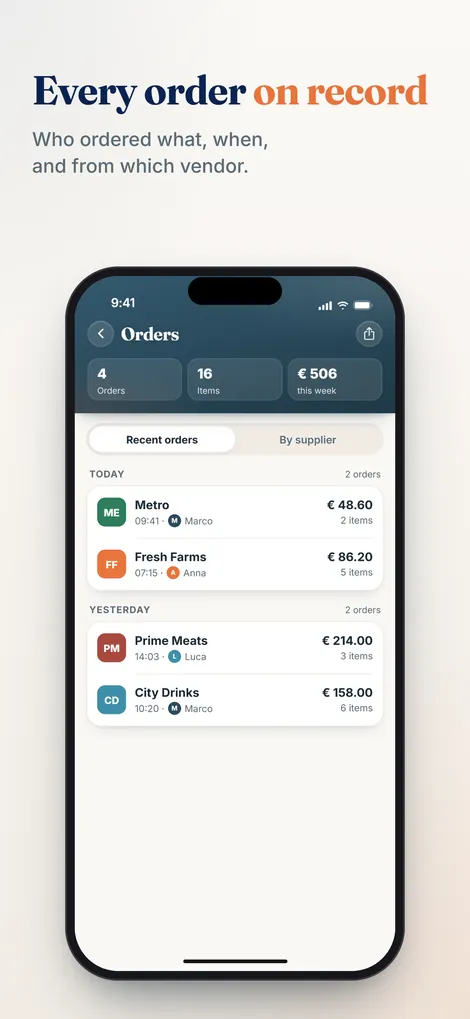
With Pelican your team collects needs together on one list, by voice or by typing, each in their own language. The head chef approves before the rep visit. What remains afterwards is the order history: what was ordered, when and from whom, traceable for good. If your team also records prices when ordering, you have the purchase total for the food cost calculation right there, instead of reconstructing it from mountains of paper.
Collect orders, keep the history, calculate more cleanly.
Pelican turns scattered needs into a finished order list and records every purchase. Try it free for 30 days, no new hardware.
Create business and try 30 days freeHow to get your costs under control with the order history is covered in the guide to controlling food costs. And if you want to work out the exact percentage from opening and closing stock, the food cost calculator will help.
Restaurant stocktake FAQs
How often does a restaurant need to do a stocktake?
Businesses whose accounts need a closing stock figure count at least once a year, usually at the end of the financial year. Whether and how that applies to your business is best checked with your accountant. Regardless of any obligation, a monthly or quarterly count pays off as a management tool, because it gives you the basis for your food cost.
What does a restaurant stocktake include?
All stock on the premises on the count date: food in the dry store, walk-in and freezer, drinks in the cellar and behind the bar, and consumables such as napkins, packaging and cleaning products. Opened packs are included and estimated. Fixed assets such as crockery or equipment are not.
How do you value opened items in a stocktake?
Estimate pragmatically and stay consistent. A pack that is a third full is recorded as 0.3, a half-full drum as 0.5. More important than the perfect number is that everyone on the team estimates the same way, so the figures stay comparable from month to month. Exact valuation follows accounting and tax principles that you agree with your accountant.
How long does a restaurant stocktake take?
With preparation and two people, the count in a single-site restaurant is often done in a few hours. Without preparation, with an untidy store and one person jumping between counting and writing, it quickly becomes a whole day. The effort is decided beforehand, not on count day.
Which prices do you use for a stocktake?
The usual choice is the net purchase price, excluding VAT, that you last paid for the item. The exact valuation rules and how to deal with price fluctuations are an accounting and tax matter. Clarify the details with your accountant so your stocktake also stands up if the tax authority (HMRC in the UK, Revenue in Ireland) ever asks.
Part of the complete guide: Restaurant purchasing. It covers all six stages of the purchasing cycle at a glance.