 Pelican
Why a chaotic store is so expensive
Stock management in a restaurant feels like a topic for quiet days. But you pay for it every day, usually without anyone writing it down. Three scenes almost everyone knows:
- The case behind the case. Clearing out on Monday, a second box turns up behind the fresh one. Opened, three weeks old, lid already damp. It goes in the bin. That wasn't kitchen waste, that was money somebody paid an invoice for.
- Ordered twice. The sous chef reports butter, the pastry chef reports butter, neither knows about the other. On Thursday there are 20 kilos in the walk-in, taking up space and tying up money you would have needed for fish that same week.
- No cream on Friday night. Full house, and of all things the item you use every day has run out. Someone drives to the shops, pays supermarket prices, and the kitchen runs on reserve for half an hour. The real damage is to the team's nerves.
The pattern is always the same. The problem is not the goods but the lack of order. If you can't see what is there, you order either too much or too little.
The basics: fixed spots and clear labels
Before you think about software, solve the problem physically. Every category gets a fixed place, and that place does not change. Dry store, walk-in and freezer are divided into zones: dairy here, veg there, meat and fish kept apart, tins and dry goods on their own rows of shelving.
Three rules make the difference day to day:
- Label the spots, not just the goods. A label on the shelf tells every new colleague where things belong. And a gap at a labelled spot is visible. A gap on a chaotic shelf is invisible.
- Date it when you open it. Every opened pack gets a label with the date. It takes five seconds and ends every discussion about whether the cream is from Tuesday or last week. The printed best-before or use-by date applies to the unopened pack; once it is opened, your date counts.
- Same order as on the order list. This is the trick most people miss. If your store is arranged exactly like your order guide, the round becomes a walk from top to bottom. No jumping around, no searching, nothing forgotten. Twenty minutes become five.
FIFO: first in, first out
FIFO is the most important principle of stock management, and it can be explained in one sentence: what comes in first goes out first. When putting a delivery away, new stock goes to the back or the bottom, the older stock moves forward and is picked first.
The challenge is putting it into practice. FIFO does not fail for lack of knowledge, but at the moment of delivery. When the driver drops the pallets at ten o'clock and everyone is busy with mise en place, someone quickly puts the new cases at the front. That is exactly where waste begins, three weeks later and right at the back of the shelf.
So putting deliveries away belongs to one person who has time for it, and it goes together with checking the delivery. While putting things away, you are already checking:
- Quantity against the delivery note. Is what's on the note actually in the box? Complaints only work straight away, not in the evening.
- Quality. Temperature of chilled goods, condition of the cases, freshness of fruit and veg.
- Shelf life. If the date is shorter than your turnover time, the goods go back. A yoghurt with four days left won't help you.
If you already have the delivery note and the case in your hands, putting things in the right place costs you no extra minute. Separate the two and you do the work twice.
Minimum levels instead of stocktake stress
The most common mistake in kitchen stock management is trying to count everything. No team keeps that up. After two weeks nobody fills in the list any more, and the figures are more wrong than before.
The workable alternative is simple minimum levels (par levels) for your core items. Not for 400 lines, but for the 20 to 30 items that move every day and without which nothing works. The rule is deliberately rough:
- Fewer than two cases of tomatoes: reorder.
- Last sack of flour opened: reorder.
- Under five litres of oil: reorder.
Stick the level straight onto the shelf, so nobody has to guess. On the daily round you decide at a glance instead of by calculation. That is not stock control, it is a visual check, and for a business without a central store it is almost always enough.
The ordering round: where store and ordering meet
This is where it all comes together. The moment you stand in the store and see the gap is the only moment you really know what you need. Two hours later in the office, half of it is gone.
The classic routine sabotages exactly that. The head chef walks through the walk-in with a scrap of paper, scribbles with cold fingers, pins the note to the door, the sous chef adds three lines, someone else does too, and in the evening someone retypes it all. Half the quantities get lost on the way, and the note from the colleague who wrote in Italian becomes a guessing game.
This is exactly the part Pelican digitalises. You walk through the store and say what is missing, straight into your phone. "Twenty kilos of vine tomatoes." On to the next shelf. No paper, no retyping.
- Everyone on the team can add, in their own language. Tomatoes, pomodori and Tomaten end up as one entry on one list. The pastry section reports its own needs instead of shouting them across.
- The list sorts itself by category. Whatever you say in random order ends up neatly arranged. In line with the categories your store is organised by.
- Approval before the rep visit. When the rep is at the door at 2 pm, you check the list once and approve it. It is finished, because it built up throughout the day.
- The order history stays. What was ordered, when and from whom remains traceable. That helps with planning quantities next month, and gives the owner an overview of spending.
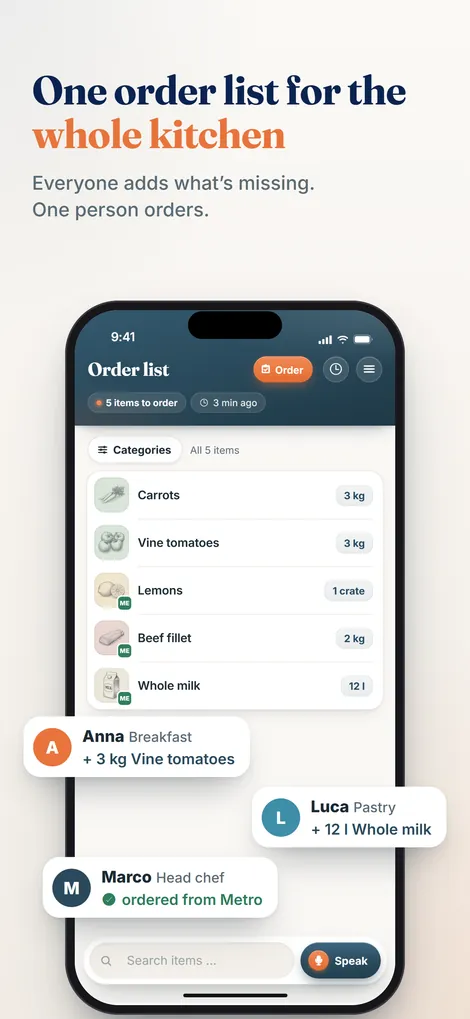
And to stay honest: Pelican does not keep stock levels. It does not replace stock management software and does not know how much flour is in your dry store. It turns the store round into a finished order list. That is the part that hurts every day.
From the store round straight to a finished order list.
Pelican collects your kitchen's needs, sorted automatically, in any language, with no data maintenance. Runs on the phones you already have. Try it free for 30 days.
Create business and try 30 days freeStore organisation checklist
Print it and pin it to the walk-in. If you can tick every point, you have your stock under control without spending a penny on software.
- Every category has a fixed spot in the dry store, walk-in and freezer.
- The spots are labelled, not just the goods.
- The order of the store matches the order on your order list.
- New stock goes behind the old according to FIFO, every time.
- Deliveries are checked while putting them away: quantity, quality and shelf life against the delivery note.
- Every opened pack gets a label with the date.
- Minimum levels for the 20 to 30 core items are stuck to the shelves.
- One fixed round per day, always at the same time, always the same route.
- Needs are recorded straight away on the round, not later from memory.
- Clear out once a week: check opened packs, plan in leftovers, get rid of clutter.
Restaurant stock management FAQs
What is the best way to organise a restaurant store?
With three things: every category gets a fixed, labelled spot. New stock goes behind the old according to the FIFO principle. And once a day someone does a quick round of the dry store, walk-in and freezer, recording straight away what needs reordering. Arrange the storage spots in the same order as your order list and the round gets much faster.
What does FIFO mean in a kitchen?
FIFO stands for first in, first out. What was delivered first is used first. In practice: when putting deliveries away, new stock goes to the back or the bottom, the older stock moves forward and is picked first. That way nothing quietly goes out of date while the fresh case sits at the front. For opened packs, a label with the date helps everyone on the team see which pack is next.
Do I need stock management software for my restaurant?
In most single-site businesses, no. Stock management software only keeps stock levels accurate if every delivery and every withdrawal is booked. That rarely happens during service. Such a system becomes interesting with several sites, a central store or standardised recipes. Before that, organising the store and a clean ordering process pay off more, and immediately. The trade-offs are covered in detail in the guide to restaurant inventory software.
How often should you check the store?
A visual check every day on the round, which takes a few minutes. More thoroughly on the days before an order or before the rep visit, so the quantities are right. Most businesses do a full stocktake with valuation monthly, some quarterly. Clearing out and checking opened packs belongs on the rota once a week.
How does Pelican help with stock management?
Honestly, not with keeping stock levels. Pelican does not know how many cases are in your walk-in. Pelican helps with the ordering round: whoever walks through the store speaks the need straight into their phone, in their own language. Everything lands on one shared list sorted by category, which the head chef approves before the rep visit. The order history later shows what was ordered, when and from whom.
Part of the complete guide: Restaurant purchasing. It covers all six stages of the purchasing cycle at a glance.