 Pelican
What an order guide actually is
An order guide is your kitchen's master list of what you buy, organized so you can move through it quickly when it is time to order. Done well, it is not a shopping list you rewrite every week. It is a standing structure you check against, so nothing is forgotten and nobody has to remember the pack size of every item by heart.
Four things belong on any order guide worth keeping:
- Clear item names. "Tomatoes" is not enough when you carry vine tomatoes for the plate and tinned tomatoes for the sauce. Specific names prevent the wrong product showing up.
- Unit and pack size. Kilo, case, sack, each: the unit decides whether the right quantity arrives. "3 cream" has surprised more than one kitchen with three cases instead of three litres.
- Par levels. The stock level you want to have on hand. Comparing par against what is in the fridge tells you the amount to order without guessing.
- Categories. Produce, meat, fish, dairy, dry goods. Grouping turns the guide into a working tool, because each supplier only sees their own block.
The classic answer: an Excel or printed template
Search for a restaurant order guide and you will find plenty of Excel and PDF templates, with columns for item, par, on hand, order quantity and price. For a small operation where one person does the buying, that works fine. Excel totals the numbers, the printout hangs by the walk-in, done.
The trouble starts the moment more than one person notices what is running low, which is every real kitchen. That is where templates fall apart:
- The printed guide lives in one place. The shortage is spotted everywhere: the walk-in, the pass, the dry store.
- The spreadsheet sits on the office computer. Between two services, with wet hands, nobody opens a spreadsheet.
- Handwriting is unreadable, lines get written twice, and in the end the chef retypes the whole thing anyway.
- Once the order is placed, the template is blank again. The history of what was ordered, when and from whom, is gone.
The order guide that fills itself in
This is a team problem, not a formatting problem, and it is exactly what Pelican solves. Instead of a template, there is one shared order list the whole brigade writes to, each person from their own phone, the moment they spot a gap. The fastest way is by voice: hold the mic, say "two cases of vine tomatoes, ten kilos of flour," done. Pelican recognizes the item, quantity and unit, sorts it into the right category and adds the name of whoever reported it.
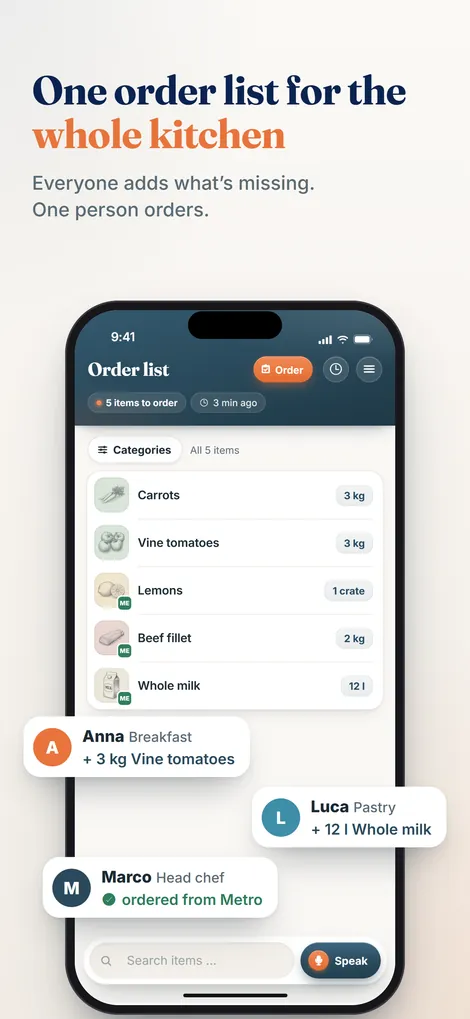
So the list meets all four criteria above without anyone maintaining a spreadsheet. The head chef reviews, adjusts quantities and approves. At the supplier visit you check items off instead of retyping them, and the order history stays for good, prices included when the team enters them.
Template or app: which fits your kitchen?
Use a template if you buy alone, your suppliers are fixed and your range barely changes.
Use a shared list the moment several people report what is needed. The time you lose today collecting scraps and retyping is the most expensive part of your order. For how to build the list itself, see the guide on the kitchen order list.
Try the order guide your team actually uses
No printing, no retyping: Pelican collects your kitchen's needs, already sorted. Free for 30 days.
Create business and try 30 days free