 Pelican
The four types of ordering app
1. Supplier marketplaces
Apps where you order directly from connected wholesalers. Convenient if your suppliers are on the platform, but you only order from those who join, and the personal rep with room to negotiate falls away. For kitchens with regional suppliers and long-standing relationships, that is often a step back.
2. Send-to-supplier tools
Apps that send your finished order to every supplier by WhatsApp or email at once. They speed up the last step, but they assume the list already exists. The real problem, gathering what is needed from five heads and three walk-ins, is not what they solve.
3. Inventory suites
Full systems with stock levels, recipes, costing and purchasing. Powerful, but training-heavy and often too much for daily use: for the stock figure to stay right, every withdrawal has to be booked, which rarely survives a busy week.
4. Team order lists
Apps that start at the first step: gathering the need across the team, sorting it and preparing it for the order, whoever and however you order in the end. This is the category Pelican belongs to.
Six criteria for choosing
- Does the whole team capture, or just one person? If only the chef can add items, the paper problem stays. Every team member needs their own access, and the list has to sync live.
- How fast is one entry? In the kitchen, speed decides adoption. Voice beats typing: "five litres of olive oil" is captured in two seconds, wet hands and all.
- Does it sort automatically? Category sorting and duplicate detection ("tomatoes" is already on) have to happen on their own, or the work just moves from paper into the app.
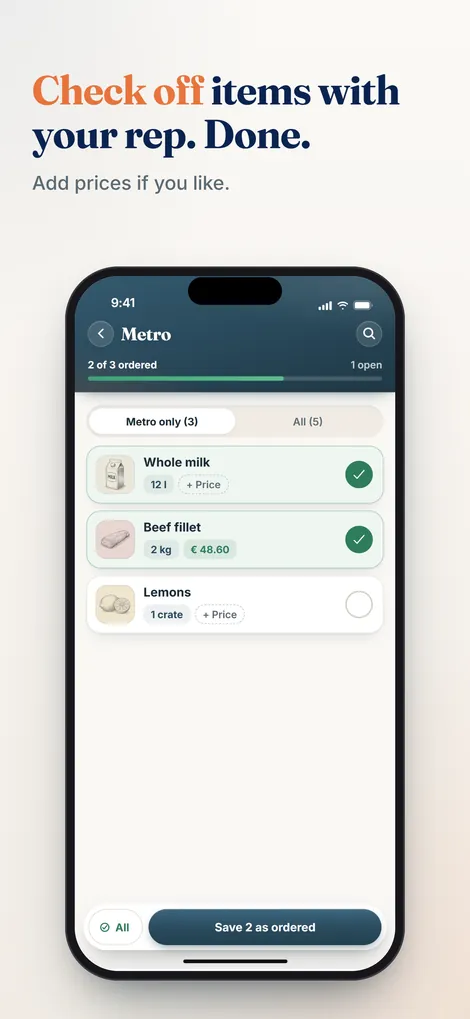
- Does it match your ordering route? Ordering from a rep on site needs a view to check off during the visit. Ordering by email needs export. Ideally it does both.
- Does a history remain? When was what ordered, from whom, by whom, at what price? The history is a control tool for the owner and the memory of the operation when staff change.
- How long does setup take? Anything over an hour to the first order is unrealistic for a running kitchen. Training-heavy systems fail on staff turnover.
How Pelican meets the criteria
Pelican is a team order list for professional kitchens. Everyone captures by voice or typing, the app recognizes item and quantity, sorts by category, merges duplicates and shows who added each entry. The head chef approves; at the supplier visit, supplier mode gives large type and a tap per item to mark it ordered. Order history, PDF export and WhatsApp sharing are built in.
One detail for mixed-language brigades: everyone speaks in their own language, English, Italian or German, and Pelican merges the same product into one entry. More in the guide on multilingual kitchen teams.
Billing is per business, not per head: the business pays once, the whole team uses the app at no extra cost. See the pricing overview for details.
Try the team order list in your kitchen
No training, no new hardware: create your business, invite the team, start. Free for 30 days.
Create business and try 30 days free