 Pelican
Work out the order quantity too?
Everything runs in your browser. Nothing is stored or sent anywhere.
What a par level is, and what it is not
Par is the normal level of an item in your kitchen. Think of the case count on the clipboard by the walk-in door: vine tomatoes 3 cases, cream 2 cases, flour 60 kg. On order day you count what is on the shelf, subtract it from par and order the difference. Nobody has to guess, and the answer is the same whether the head chef or the newest commis does the count.
Three things often get mixed up with par:
- Par is not a stock count The count tells you what you have. Par tells you what you should have. You need both, but only par turns a count into an order.
- Par is not a reorder point A reorder point (sometimes called a minimum level) is the low mark that says "order now". Par is the level you order up to. Kitchens with fixed delivery days mostly work with par, because they order on set days anyway.
- Par is not a wish list A par that is too high ties up cash and fills the bin with spoiled produce. The goal is enough to get through to the next delivery plus a small buffer, not a full storeroom.
Par levels live on your restaurant order guide, the standing list of everything you buy from each supplier. The order guide says what you buy and in which unit. The par says how much of it you need.
The par level formula
Order quantity = par level − on hand, rounded up to full packs.
Each part has a job:
- Daily usage Is the average amount you go through on a day you are open. Weekly usage divided by the days you are open. Use real numbers from the last two to four weeks, not a feeling.
- Days between deliveries Is how long the next delivery has to last. Produce every morning: 1. Dry goods on Thursdays only, open six days: 6.
- Lead time Is how many open days pass between your count and the moment the delivery is in the kitchen. If you count after dinner and the truck comes before lunch, that is 0. If the rep takes the order on Monday and delivers on Thursday, that is 3, and you will cook through those three days with what is on the shelf now.
- Safety stock Covers the busy Saturday, the late truck and the item that comes in short. A simple starting point is one extra day of usage for things delivered weekly and a fraction of a day for things delivered daily. Adjust it after two weeks.
Why you find two different formulas online
Search for how to calculate par levels and you will see two versions. One is usage per delivery period plus safety stock. The other is daily usage times lead time plus safety stock. Both are special cases of the formula above:
- Usage per delivery period Is right when you count on delivery day, or when the order arrives before the next service. The lead time is then close to zero.
- Usage times lead time Is right when you can order any day and the goods take a while to arrive. The delivery period then hardly matters.
Most kitchens have both at once: fixed delivery days and a gap between order and delivery. Leave out either part and you run short in the same spot every week. The calculator above shows both numbers: the par to order up to when you count, and what should be on the shelf right after the delivery arrives.
Three worked examples
The numbers below are examples to show the math. Your own usage is the only number that counts for your kitchen.
Vine tomatoes, delivered every morning
A bistro open six days uses about 48 kg of vine tomatoes a week, so 8 kg a day. The produce supplier delivers every morning, and the order goes out after dinner service. Days between deliveries: 1. Lead time: 0, because the tomatoes arrive before the next lunch. Safety stock: half a day, so 4 kg, for the Saturday when the salad sells twice as fast.
Par = 8 × (1 + 0) + 4 = 12 kg. After dinner on Tuesday there are 5 kg left. Order 7 kg, or one case if the supplier only sells cases.
Flour, delivered once a week
The same bistro bakes its own bread and uses 36 kg of flour a week, so 6 kg per open day. Dry goods come once a week on Thursday. The rep takes the order on Monday. Days between deliveries: 6. Lead time: 3 (Monday, Tuesday and Wednesday are cooked from current stock). Safety stock: one day, 6 kg.
Par = 6 × (6 + 3) + 6 = 60 kg. On Monday you count 22 kg and order 38 kg. By Thursday you have used 18 kg, so 4 kg are left when 38 kg arrive. That is 42 kg on the shelf, enough for six days plus the buffer.
Now the same week with the short formula, weekly usage plus buffer: par 42 kg, order 20 kg on Monday. On Thursday you have 4 kg plus 20 kg, which is 24 kg for six days of baking. The flour runs out on Monday, three days before the next delivery. That is the classic par mistake, and it is why the lead time belongs in the formula.
Cream, sold by the case
The pastry section and the line together use about 9 liters of cream a day. The dairy delivers three times a week, every second open day, ordered the afternoon before. Days between deliveries: 2. Lead time: 1 (the dinner service after the order still runs on current stock). Safety stock: 15 percent.
Par = 9 × (2 + 1) = 27 liters, plus 15 percent is about 31 liters. You count 11 liters and need 20. The cream comes in cases of 6 liters, so you order 4 cases, 24 liters. Rounding up to packs is fine. Rounding up by a full case on every order is how a walk-in fills with cream that expires before it is used, so check the date on what is left.
How to set par levels in five steps
- Pick your core items. Not all 400 lines. Start with the 20 to 30 items that move every day and that would stop service if they ran out: the proteins on the menu, dairy, eggs, flour, oil, the vegetables in your bestsellers. Everything else stays on the normal order guide.
- Find the real usage. Take two to four weeks of supplier invoices, your order history or two stock counts with the deliveries in between. Divide the total by the number of days you were open. One week is too short, because one big party skews it.
- Write down delivery days and lead time. For each supplier: which days they deliver, the order cutoff and how many open days pass between order and delivery. This usually lives in someone's head. Put it on paper.
- Calculate and round. Use the formula or the calculator above. Round up to full packs, then sanity check against two limits: shelf life (a par of 3 days of herbs makes no sense if herbs last 2) and storage space (a par that does not fit in the walk-in is not a par).
- Review after two weeks. On each delivery day, look at what was left before the truck arrived. If it is regularly far above your safety stock, lower the par. If you ran out, raise it. Then review again after every menu change and at the start of each season.
Your par sheet
A par sheet is the working version of all this: one line per core item, sorted the way you walk through the storeroom, with the par already filled in. On order day you only fill in two columns.
| Item | Unit | Par | On hand | Order |
|---|---|---|---|---|
| Vine tomatoes | kg | 12 | 5 | 7 |
| Flour, type 55 | kg | 60 | 22 | 38 |
| Heavy cream | liter | 31 | 11 | 24 (4 cases) |
| Eggs | tray of 30 | 8 | 3 | 5 |
Three habits make a par sheet work:
- Same order as the shelves If the sheet lists dairy first but the dairy is at the back of the walk-in, the count takes twice as long and items get skipped.
- One unit per line, always the same If par is in kilos and someone counts in cases, the order is wrong. Write the unit on the sheet and on the shelf label.
- Separate sheet per supplier Or at least one block per supplier, so you finish one order before you start the next.
If you want a ready file, the free restaurant order list template in Excel and PDF works as a starting point: add a par column next to the quantity. For the count itself, the restaurant stocktake guide has a count sheet and the routine for count day.
Weekends, events and seasons
One par per item is a good start. A few items need more than one:
- Weekend par If Friday and Saturday use far more than a weekday, keep a second, higher par for the items that swing the most. Use it on the order that has to carry you through the weekend.
- Events A wedding for 120 is not a busy Saturday. Order the event on top of par from the banquet order, and do not raise the par for it.
- Seasons and menu changes Asparagus season, the summer terrace, a new dessert: every change in what you sell is a change in usage. Recalculate the affected items the week the menu changes, not when the first shortage hits.
Common par level mistakes
- Set once, never touched The par that was right for last winter's menu is wrong for this summer. Pars need a date and a review.
- Gut feeling pars "We always order three cases" is a habit, not a par. Two weeks of real numbers beat years of habit.
- Forgetting the lead time The flour example above: the par covers the delivery period but not the days until the delivery arrives.
- Pars for perishables that are too high Fish, herbs and berries need tight pars and frequent deliveries. Every extra kilo is waste waiting to happen.
- Pars nobody can see A par in the chef's head or on the office computer does not help the cook doing the count at 10 pm. It belongs on the sheet and next to the shelf.
For the bigger picture of how pars fit into storage, FIFO and the ordering round, see the guide on restaurant stock management.
Where Pelican fits, and where it does not
To be clear up front: Pelican does not calculate par levels and does not keep stock levels. It is not an inventory system with stock bookings, not a POS and not a guest ordering app, and it does not replace your supplier or the price talk with the rep. If you want software that tracks every withdrawal, you need an inventory system.
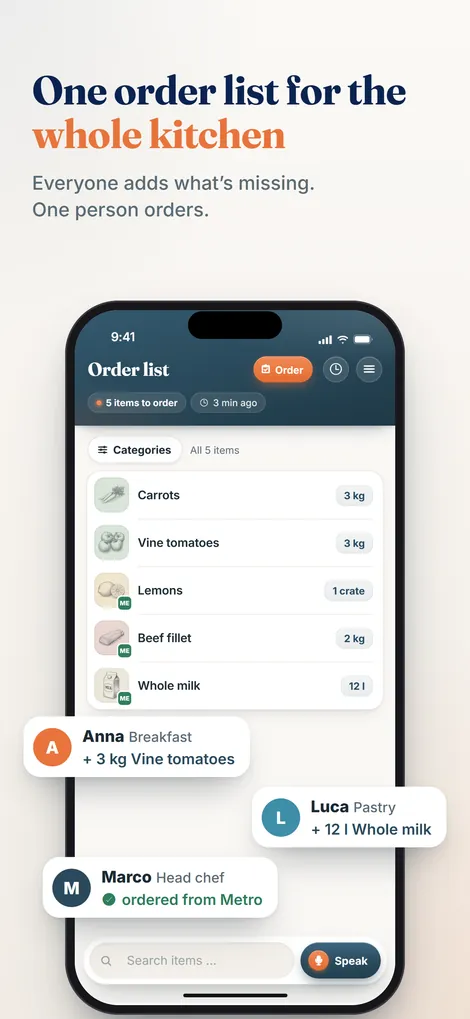
What Pelican does is the step right after the par sheet. Whoever counts says what is missing straight into the phone, for example "seven kilos of vine tomatoes, four cases of cream". Everyone on the team adds to the same list, by voice or typing, in English, Italian or German. Pelican recognizes the product, merges duplicates and sorts the list by category. The head chef reviews and approves it before the rep visit or before it goes out as a PDF or by WhatsApp.
The order history that builds up along the way is also useful for par levels: it shows what was ordered, when, from which supplier and by whom. Ordered is not the same as used, so check it against a count, but over a few weeks it is a quick first estimate of usage per item.
Pelican is billed per business, not per user: Solo 19 euros per month (up to 3 users), Basic 29 euros per month (up to 5 users), Pro 59 euros per month (unlimited users). Paid yearly it is 15, 24 or 49 euros per month. Every plan starts with 30 days free.
Frequently asked questions
What does par mean in a kitchen?
Par is the normal stock level you want on hand for an item so the kitchen gets through to the next delivery without running out. On order day you compare par with what is on the shelf and order the difference.
How do you calculate par levels?
Par level = average daily usage × (open days between deliveries + open days of lead time) + safety stock. Example: 6 kg of flour a day, one delivery every 6 open days, 3 days lead time and one day of buffer gives 6 × 9 + 6 = 60 kg.
What is the difference between a par level and a reorder point?
A par level is the amount you order up to. A reorder point is the low mark that tells you it is time to order. Kitchens with fixed delivery days usually work with par levels, because they order on set days anyway.
How often should you update par levels?
Check new par levels after two weeks, then at least every season and every time the menu, the supplier or the delivery days change. If you keep throwing an item away, the par is too high. If you keep running out, it is too low.
Should par levels be different on weekends?
If Friday and Saturday use much more than a weekday, yes. Many kitchens keep a weekday par and a weekend par for the items that swing the most, and use the weekend par on the order that has to carry the kitchen through the weekend.
What is a par sheet?
A par sheet is a list of your core items with unit, par level, a column for what is on hand and a column for the order quantity. You count on order day, subtract on hand from par and the order is done.
Your par sheet says what is missing. Pelican turns it into the order.
The whole team adds to one list by voice, sorted by category, approved by the chef. Free for 30 days.
Create business and try 30 days free