 Pelican
Why a personal rep is worth their weight in gold
Many digital tools want to get rid of the supplier's rep and turn everything into online orders. That misunderstands how hospitality works: the rep knows your business, tells you what is good quality this week, passes on special prices, and prices are negotiated better in person than through a form. The problem is not the rep visit. The problem is going into it unprepared.
This guide is about the ordering routine at the meeting itself. How to find, compare and choose the right restaurant suppliers in the first place is covered in a separate guide.
An unprepared meeting costs you twice
- Time: hunting for notes, asking the team, shouting "what else do we need?" across the kitchen while the rep waits.
- Money: order in a rush and you don't compare prices, and you order on gut feeling rather than need. Forgotten items are bought later at a premium.
- Nerves: double orders, because two people independently ordered "just to be safe".
What the prepared routine looks like
- Needs build up all week. The team reports gaps straight away on a shared list, not on the morning of the meeting. How that works properly is explained in the guide to the ordering process.
- Before the meeting: review and approve the list. The head chef goes through the sorted list, corrects quantities and strikes out anything unnecessary. Five minutes that save half an hour in the meeting.
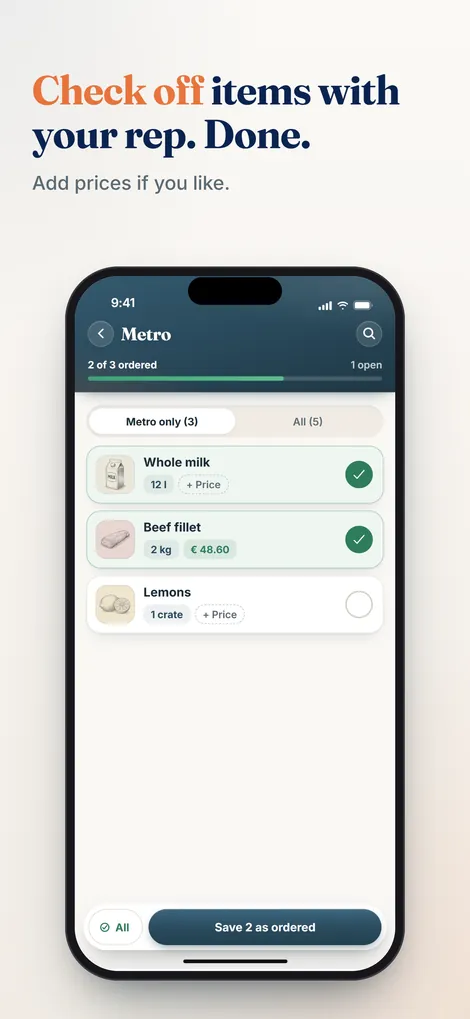
- In the meeting: tick off, don't search. Go through item by item, note the price, mark it as ordered. Whatever the rep can't deliver stays visibly open for the next supplier.
- After the meeting: history, not forgetting. What was ordered from whom at what price? That information belongs in the business's memory, not on a note that gets thrown away, and it also feeds your view of food costs.
Rep mode in Pelican
Pelican has its own mode for exactly this meeting: the head chef opens the approved list in rep mode, with large type, sorted by category, and one tap marks an item as ordered. The price can be recorded too if you like. Several suppliers on the same day? You tick off per rep, and open items carry over visibly to the next meeting.
If no rep is coming, the list goes straight to the supplier as a PDF, by email or via WhatsApp, split by supplier if you like. And every order automatically lands in the order history: when, what, from which supplier, by whom and at what price.
Your next rep visit: prepared, not rushed
A sorted list, one-tap ticking off, a complete history. Pelican is ready to go in minutes, free for 30 days.
Create business and try 30 days freePart of the complete guide: Restaurant purchasing. It covers all six stages of the purchasing cycle at a glance.