 Pelican
What receiving is and why it matters
Receiving is the check at the back door, before product goes into storage and before anyone signs the invoice. It does two jobs. The first is money: you only pay for what you ordered and what actually arrived. The second is food safety: product that is too warm, spoiled or mislabeled never makes it into your kitchen.
In the US, the FDA Food Code, which state and local health departments adopt in some version, covers receiving in section 3-202. It says, for example, that refrigerated time and temperature control for safety (TCS) food is to be received at 41 °F (5 °C) or below, unless another rule allows otherwise. In the UK and the EU, Regulation (EC) No 852/2004 on food hygiene requires procedures based on HACCP principles and says raw materials must not be accepted if they are known to be spoiled or contaminated. Your health department or local authority tells you which version applies to you.
Receiving checklist: what to check on every delivery
- Invoice against the order Every item in the quantity, size and spec you ordered. Substitutions and extra lines show up here.
- Count and weight Count cases and pieces, weigh meat, fish and cheese. Take off packaging, and let ice drain from fish.
- Temperature Check cold and frozen food with a probe thermometer, or between two packs, and compare with the label and your food safety plan. Frozen product with ice crystals or soft spots has thawed.
- Dates Look at use by and best by dates. Product that will not last as long as you need it is a reason to push back, even if it has not expired yet.
- Packaging Damaged, torn, wet, vacuum seal broken? Do not accept cans that are dented on the seam or bulging.
- Look and smell Smell, color, texture. For fish, clear eyes and red gills. For produce, no rot in the bottom layer of the case.
- Labels Label, lot number, and for shellfish the tags you are required to keep. You need the lot number when a product is recalled.
- Truck and driver Cold product comes on a refrigerated truck, kept apart from chemicals. If something looks wrong, it goes in the log.
Receiving procedure in seven steps
- Have the order ready Before the driver knocks, you know what was ordered: the order guide, the order history or the supplier's confirmation. Without it you can only tick off the invoice, not check it.
- Check the invoice against the order Is every item on it, in the quantity and spec you ordered? Any substitutions nobody asked for?
- Check cold and frozen food first Take the temperature, compare it with the label and your food safety plan, and get it into the walk-in or freezer right away. Dry goods can wait.
- Count and weigh Count cases, weigh meat and fish, check piece counts. Spot checks are fine for dry storage items. Weigh everything that is expensive.
- Look at dates, packaging and labels Use by and best by dates, damaged or thawed packs, missing labels and lot numbers, smell and look.
- Note problems on the invoice Short, wrong or too warm: write it on the invoice, have the driver sign, take a photo. Product you should not accept goes straight back on the truck.
- Put away and log it Store using FIFO, write the check into the receiving log and pass the invoice on for payment.
How to put product away so the oldest gets used first is covered in the guide to restaurant stock management.
Worked example: what a missed shortage costs
A restaurant orders 10 lb of salmon fillet at the agreed price of $24.00 per lb. The truck brings 9.4 lb, but the invoice says 10 lb at $25.50 per lb. The cook at the door is busy and only counts the case, so neither problem gets caught.
The difference comes from two mistakes. 0.6 lb is missing, which is $15.30 at the invoiced price. On top of that, the higher price on the weight that did arrive adds $14.10. Together that is $29.40 on a single delivery.
The receiving log
What you check, you write down. The log shows the health inspector that your system works, and it shows you which supplier keeps delivering too warm, short or close to the date. A sheet on a clipboard by the back door is enough, as long as it gets filled in every day. A receiving log can look like this:
| Date | Supplier | Invoice | Product | Temp | Dates | Result | Initials |
|---|---|---|---|---|---|---|---|
| Tue 8:10 | North Seafood | INV 4471 | Salmon fillet | 36 °F | Thu | 0.6 lb short, noted | MK |
| Tue 9:40 | Hill Dairy | INV 1182 | Cream, butter | 40 °F | 9 days | OK | MK |
| Tue 10:15 | Frozen Direct | INV 90310 | Fries, frozen | −2 °F | 2027 | 1 case damaged, sent back | AS |
The format matters less than the habit: every delivery gets a line, including the ones where everything is fine. Keep logs and invoices for as long as your food safety plan, your health department and your tax records require.
When something is wrong: how to reject and get credit
How the claim gets lost
- Invoice signed without checking
- Shortage only noticed when putting away in the afternoon
- Phone call to the supplier with no proof
- Invoice paid, credit memo never arrives
How you get your money
- Problem written on the invoice, driver signs
- Photo of the label, thermometer or scale
- Product you cannot accept goes back on the truck
- Invoice paid only after it matches the delivery and the credit memo
Do not accept product that is too warm, spoiled or damaged. For shortages, a note on the invoice is enough, and the bill then has to match what was delivered. Agree with every supplier upfront how rejections and credits work and who your contact is. How to choose suppliers and keep track of terms is in the guide to restaurant suppliers.
Who receives, and when
Most receiving mistakes are not carelessness. The delivery lands in the middle of prep, and whoever opens the door does not know what was ordered. Three rules help:
- One person is responsible Each shift has one person for receiving who can see the order. If someone covers, they know where the thermometer, the scale and the log are.
- Agree on delivery windows Ask your suppliers to deliver outside service. A check at 10am works. One at 12:15 rarely does.
- Make the order visible The person receiving has to see the order, not just the person who placed it. Otherwise the invoice becomes the only record, and it comes from the supplier.
Where Pelican helps, and where it does not
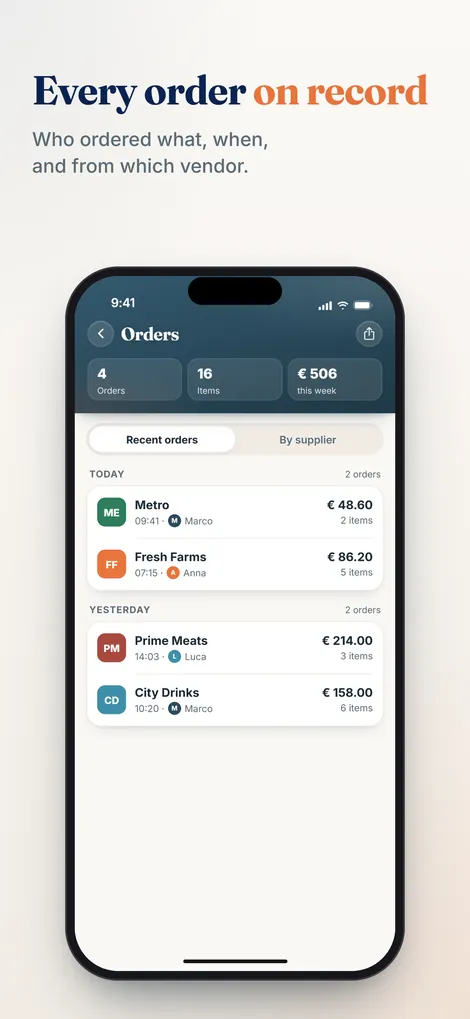
Receiving only works if the order is on record. Pelican is the ordering app for professional kitchens: the team adds what is running low, by voice or typing, each in their own language. The chef approves the list, and the order history shows what was ordered when, from which supplier and by whom. Whoever is at the back door opens the order on their phone and checks the invoice against it. If the team enters prices when ordering, you also see the price that was agreed. How that helps with food costs is covered in the guide to controlling food costs.
A scanner for delivery notes and invoices is in the works: take a photo and Pelican checks whether quantity and price match the order. Until then, you compare yourself. What Pelican is not: it is not food safety software, it does not take or log temperatures and it does not replace your receiving log. Pelican does not track stock levels, is not a POS and not a guest ordering system, and it does not replace your suppliers. It does not place the order with the supplier either. Your team still does that. Pelican is billed per business, not per user: Solo 19 euros per month (up to 3 users), Basic 29 euros per month (up to 5 users), Pro 59 euros per month (unlimited users). Paid yearly it is 15, 24 or 49 euros per month. Every plan starts with 30 days free.
Restaurant receiving FAQs
What should be on a restaurant receiving checklist?
The invoice checked against the order, count and weight, temperature of cold and frozen food, use by and best by dates, packaging, look and smell, labels and lot numbers, and the condition of the truck. Each delivery then gets a line in the receiving log.
At what temperature should cold food be received?
In the US, the FDA Food Code says refrigerated TCS food is to be received at 41 °F (5 °C) or below, with some exceptions set out in section 3-202.11. Check which version your health department uses, and write your limits into your food safety plan next to the thermometer.
What do I do if a delivery is short?
Write the shortage on the invoice before you sign and have the driver sign next to it. Then make sure the bill matches what was delivered or a credit memo comes through. A photo of the scale or the open case helps if there are questions.
Do I have to weigh every delivery?
No. Weigh expensive and fresh product like meat, fish and cheese. For dry goods and beverages, counting and spot checks are enough. If a supplier keeps coming up short, weigh everything from them again.
How long should I keep receiving logs?
There is no single period for every business. Your health department, your food safety plan and your tax records set it. Shellfish tags have their own rules under the Food Code. When in doubt, ask your local health department.
Every order at hand when the truck pulls up
Your team orders from one shared list, the chef approves, and whoever is receiving sees in the order history what was ordered. 30 days free.
Create business and try 30 days free