 Pelican
What inventory management means in a restaurant
Inventory management sounds like software. But first and foremost it is a chain that exists in every business, with or without a system. It has six links:
Highlighted in orange is what Pelican covers. At goods in, items are ticked off but no stock is booked. For analysis, the order history provides quantities and spending, but no recipe costing. A classic inventory management system covers all six links, as long as it is maintained.
An inventory management system (often just called stock control software) is the attempt to map this whole chain in one piece of software and make it able to answer questions at any time. The key question for your business is not whether the chain exists. It does. The question is which part of it you want to map digitally and what price you pay for that in working time.
What a classic inventory management system does
A full restaurant inventory management program can do a lot, and rightly so:
- Real-time stock levels. In theory the system knows at any moment how much beef fillet is in the building, because every delivery and every withdrawal is booked.
- Recipe management and costing. Every dish is linked to stored ingredients with quantities and prices. If the price of butter goes up, you see straight away which dishes get more expensive and where your margin disappears.
- Integration with till and suppliers. Selling a dish at the till books its ingredients out of stock. Orders go electronically to the wholesaler, price lists come back automatically.
- Automatic order suggestions. From minimum stock, previous weeks' usage and lead time, the system calculates what needs reordering.
- Stocktake support. Count sheets, expected-versus-actual comparison and shrinkage calculation come straight out of the system.
That's not marketing, it works. As long as the data is right.
The catch: maintenance
An inventory management system is only as good as its data. And every one of these functions assumes someone keeps feeding it:
- Every delivery has to be booked in, including the two cases of salad the rep brings along at lunchtime.
- Every recipe has to be set up and maintained, even when the sous chef spontaneously uses girolles instead of button mushrooms today.
- Every withdrawal has to be recorded, including the cream the commis grabs from the walk-in in the 7 pm rush.
- Every price change has to be entered, or the system calculates with figures from the autumn before last.
In a kitchen with five people and a full house, that simply doesn't happen. Not out of laziness, but because between lunch and dinner service nobody has time to fill in a form. Almost everyone who has tried knows the result: an expensive system, stock levels weeks behind reality, and a team that no longer trusts the numbers. In the end someone counts the walk-in by hand again, and the software is a licence that keeps running on subscription.
The pragmatic start: get the ordering process under control first
For everyone else, it is worth taking an honest look at where the pain really sits day to day. And it almost never sits in stock levels. It sits in ordering:
- Items have been forgotten because nobody wrote them down. No cream on Friday night.
- Double orders, because two people reported the same thing independently.
- Notes on three different doors, illegible, without quantities.
- The head chef retypes everything in the evening.
- Once the order is placed, the list is gone. Nobody knows any more what was ordered, when, from whom and at what price.
At a rough estimate, a good 80 per cent of the daily hassle is here, and none of these points needs stock control. They just need one shared list everyone can write to, and a memory.
This is exactly the part Pelican digitalises, without anyone having to maintain anything extra. The kitchen team captures the need the moment the gap is noticed, by voice from their own smartphone. Each in their own language: tomatoes, pomodori and Tomaten end up as one entry. The list sorts itself by category, and the head chef reviews and approves it before the rep visit. The order history builds up as a by-product and shows the owner what was ordered, when and from whom.
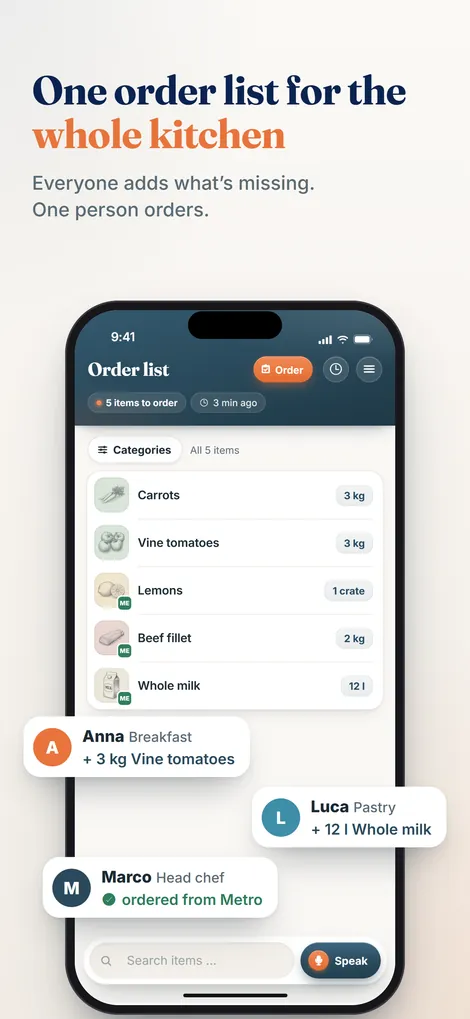
The difference from a full system lies in the words "as a by-product". Nobody books anything, nobody maintains master data. The data is created as a by-product of work the team does anyway. That is exactly why it is still there after three months, while the stock levels in an unmaintained inventory system have long since become fiction.
Comparison: full system or lean ordering app
| Criterion | Classic inventory system | Pelican |
|---|---|---|
| Ordering as a team | usually via one person at the office computer | everyone at once, by voice from their phone |
| Stock control | yes, in real time if everything is booked | no |
| Recipes and costing | yes, including price tracking | no |
| Order history | yes | yes, created automatically |
| Till integration | usually available | no |
| Setup effort | master data, recipes, training: weeks | create business, invite team: one afternoon |
| Ongoing maintenance | book daily, otherwise the figures are wrong | none, the data is created while ordering |
| Hardware | often terminal, scanner, office computer | the phones the team already has |
| Cost per month | roughly €50 to several hundred €, depending on scope | €19 Solo up to 3 users, €29 Basic up to 5 users, €59 Pro unlimited |
| Suitable for | chains, large kitchens, businesses with a purchasing department | restaurants and hotel kitchens without dedicated data maintenance |
The table shows no winner, just two different tools. A full system answers the question "What do I have in the building and what does my dish cost me?". An ordering app answers the question "What does my kitchen need and what have I ordered?". The second question comes up every day; for many businesses, honestly, the first comes up once a month when calculating food cost.
Deciding in four questions
Before you get quotes for inventory software, answer these four questions honestly:
- Do you need up-to-date stock levels? Not "it would be nice". Rather: do you make decisions that go wrong without live stock figures?
- Do you cost recipes systematically? Really every dish with stored ingredients, not a rough estimate once a year?
- Do you have a person who maintains data every day? With time for it on the rota, not "the boss does it in the evening".
- Where do you actually lose money day to day? Through wrong stock figures, or through forgotten and double-ordered goods?
If you answer no twice to the first three questions, don't buy a full system. It won't be maintained and won't give you figures you trust. Start with the ordering process. It brings calm immediately, costs a fraction and creates, as a by-product, the history you can use to control your food costs. If you grow in two years' time and need an inventory system, you take that step with a team that has long been used to ordering digitally.
Start where it hurts every day.
Pelican collects your kitchen's needs, sorted automatically, in any language, with no data maintenance. Runs on the phones you already have. Try it free for 30 days.
Create business and try 30 days freeRestaurant inventory software FAQs
What is a restaurant inventory management system?
An inventory management system maps a business's entire flow of goods digitally: ordering, goods in, stock levels, usage through recipes and the analysis at the end. It keeps running stock levels, suggests order quantities and costs dishes. The precondition is that every movement is booked in the system, and that is exactly where it usually fails in small kitchens.
How much does restaurant inventory software cost?
The ranges are wide. Lean cloud solutions for a single site are roughly in the region of 50 to 150 euros a month; comprehensive systems with till and supplier integration reach several hundred euros a month. On top of that there are often one-off costs for setup, master data and training. Be honest and include the working time for daily maintenance too. It is usually a bigger cost than the licence.
Is there free inventory software for restaurants?
Free versions are almost always cut-down entry versions or time-limited trials. They stop where it gets interesting: number of users, integrations or reports. More importantly, the price changes nothing about the real problem. Even a free system has to be fed every day. If that doesn't happen, the stock levels are wrong after two weeks and the software is worthless.
Is an ordering app enough instead of an inventory system?
For many small and medium-sized businesses, yes. The day-to-day pain is almost always in ordering: forgotten items, double orders, paper chaos, no history. An ordering app solves that with no maintenance effort. If you need up-to-date stock levels or cost every dish systematically, you can't avoid a full system. What to look for when choosing is covered in the guide to the restaurant ordering app.
Is Pelican an inventory management system?
No. Pelican is an order planning app for professional kitchens. The team captures needs together by voice or by typing, the list sorts itself by category, the head chef approves it and the order history builds up automatically. Pelican does not keep stock levels, does not cost recipes, is not a till system and not a guest ordering system. It covers the part of inventory management that hurts every day.
Part of the complete guide: Restaurant purchasing. It covers all six stages of the purchasing cycle at a glance.