 Pelican
Why stock ordering is chaotic in so many kitchens
It plays out the same way in almost every professional kitchen. During mise en place the chef de partie notices the cream is running low and scribbles it on the back of a ticket. The veg chef writes "ONIONS!!!" on a scrap of paper. Someone types a note into their phone. By the end of the day there are five notes in three different handwritings in four places, and when the supplier's rep walks in the next morning, the head chef hunts them all down and hopes nothing is missing.
Every operator knows the result: forgotten items, double orders and emergency runs to the supermarket at three times the price. Not because the team works badly, but because there is no system.
What a clean ordering process looks like
A working stock ordering process in a restaurant has four steps, and they should be kept clearly apart:
- Capture needs all day, from the whole team. Whoever spots a gap in the walk-in records it straight away. Not later, not "when I get a minute". The moment you notice is the only reliable moment.
- Collect everything in one place. All requests end up on a single list, not on scraps of paper, not in three WhatsApp groups. One list that everyone can see.
- Review and approve. The head chef goes through the list, strikes things out, adjusts quantities and signs it off. This is where responsibility belongs, not at the capture stage.
- Place the order. With the rep, by phone or by email: with a sorted list it takes minutes instead of half an hour.
Common mistakes, and how to fix them
1. Needs live in people's heads and on scraps of paper
Paper gets lost, and heads go home at the end of the shift. Anything that is not recorded centrally straight away is down to luck. The fix is one shared place to collect needs that is always to hand. In practice that means the smartphone already sitting in every chef's jacket pocket.
2. People "order" while they are still capturing
If everyone rings the supplier directly, the business loses its overview and its negotiating position. Capturing and ordering are two separate steps, with the head chef's approval in between.
3. The list is not sorted
A list in the order things came to mind ("cream, onions, salmon, cream again…") is useless when it is time to order. Sorted by category (veg, meat, fish, dairy, dry goods), the same list becomes a tool: the head chef works through it top to bottom with the greengrocer, then moves on to the next block for the butcher.
4. Nobody knows who asked for what
"Who wrote down rice, and how much do we really need?" Without a name there is nobody to ask. Every request needs a name attached.
Excel, WhatsApp or an app: what should you use?
Excel and templates work when one person does all the buying, but they fail with a team: the file sits on a computer in the office, not in the kitchen where the need arises. More on that in the guide to the restaurant order guide. If you still want to start on paper, our free order list template in Excel and PDF is already sorted by category.
WhatsApp groups are at least mobile and shared, but a chat group is not a list. Requests scroll away between rota discussions, nothing is sorted, nothing can be ticked off, and in the end someone still retypes everything.
An ordering app combines both: mobile like WhatsApp, structured like Excel. What to look for when choosing one is covered in the guide to the restaurant ordering app.
How stock ordering works with Pelican
Pelican is built for exactly this process. Everyone in the kitchen team records a need the moment they notice it, fastest by voice: hold the mic, say "three kilos of tomatoes, five litres of olive oil", done. Pelican recognises the item and the quantity, files it under the right category automatically and adds it to the shared list the whole team sees live, with a name attached.
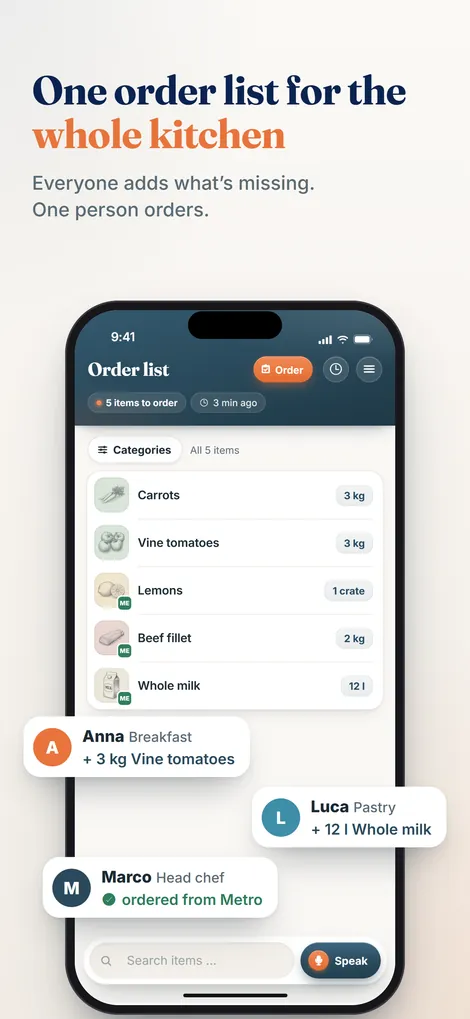
When the rep arrives, the head chef opens rep mode: large type, a sorted overview, every item marked as ordered with a single tap. No retyping, no searching, and afterwards the order history shows in black and white what was ordered, when and from whom.
Stock ordering without the paper trail
Pelican runs on the devices your team already carries. Set up in minutes, free for 30 days.
Create business and try 30 days freePart of the complete guide: Restaurant purchasing. It covers all six stages of the purchasing cycle at a glance.