 Pelican
What is a ghost kitchen?
Friday, 7 pm. Four tablets are pinging on the line, paper bags sit on the pass where plates would be, and drivers wait at the door where guests would. There is no dining room, no servers and no reservations. That is a ghost kitchen: a commercial kitchen that produces only for delivery and pickup.
Guests find the food in a delivery app or on your own ordering site. What they see is a brand with a name, a logo and a menu. They do not see that three brands can come out of the same kitchen. The terms you will run into:
- Ghost kitchen, dark kitchen, cloud kitchen Three names with the same meaning: a kitchen without a dining room that only delivers. Ghost kitchen is the usual term in the US, dark kitchen is common in the UK and much of Europe. Cloud kitchen means the same thing.
- Virtual brand A restaurant that exists only in the app, also called a virtual restaurant or ghost restaurant. One kitchen can run several, for example burgers, bowls and pasta.
- Delivery platform The marketplace guests order through. It brings reach and often the couriers, and it takes a commission on every order.
- Shared kitchen facility An operator builds many small kitchens under one roof and rents them out one by one, often with shared storage, a dish area and a pickup zone for drivers. You will also hear kitchen as a service.
The four ghost kitchen models
Not every ghost kitchen works the same way. The four common models differ mainly in who owns the kitchen and how much you invest up front.
- Your own kitchen, one brand You lease or own a kitchen and run one delivery brand out of it. Full control, and the whole investment is yours.
- One kitchen, several brands The same crew cooks for several virtual brands. That fills the kitchen better, but it takes tight routines and menus that share many ingredients.
- A rented kitchen in a shared facility You move into a finished kitchen run by an operator. You start fast, and in return you pay rent and share storage, the dish area or the pickup zone with others.
- A virtual brand in your own restaurant Your restaurant stays as it is and also delivers under a second name. The cheapest way in, as long as the line still has room during service.
| Model | Up-front investment | Strength | Fits when |
|---|---|---|---|
| Own kitchen, one brand | high | full control of kitchen and workflow | you have a proven concept and plan long term |
| One kitchen, several brands | high | better use of kitchen and crew | the brands share many ingredients |
| Rented kitchen in a shared facility | low to medium | fast start, shorter commitment | you want to test a neighborhood or a concept |
| Virtual brand in a restaurant | low | uses the kitchen and crew you already have | your kitchen has room outside the rush |
Ghost kitchen vs. restaurant: what goes away and what gets added
The math of a ghost kitchen looks different from the math of a restaurant. Some big cost blocks disappear, and new ones take their place.
What goes away
- Dining room, furniture and decor
- Servers and hosts
- A prime location with foot traffic
- Plates, linen and reservations
What gets added
- Commission to the delivery platform
- Packaging for every order
- Dependence on ranking and reviews in the app
- No direct contact with the guest
The biggest difference is not on the line. It is in the costing. In a restaurant the whole check is yours. In a ghost kitchen a fixed share of every order goes to the platform before you have paid for food, labor and rent.
Worked example: what you keep per order
An example with round numbers, all amounts before sales tax. The percentages are example values. Put in the numbers from your own contract and your own costing.
| Item | Calculation | Amount |
|---|---|---|
| Average order value | example value | $30.00 |
| Platform commission | 30% of $30 | $9.00 |
| Food cost | 30% of $30 | $9.00 |
| Packaging | per order | $1.50 |
| Left per order | 30 minus 9 minus 9 minus 1.50 | $10.50 |
That $10.50 pays for everything that comes due every month: labor, rent, utilities, software, insurance. If those fixed costs are $8,400 a month in this example, you need 8,400 divided by 10.50, so 800 orders, to cover them. Over 30 days open that is about 27 orders a day. Only the orders beyond that earn a profit.
Food cost shows how sensitive the math is. If it climbs from 30% to 35%, you keep only $9.00 per order. Then you need about 933 orders a month and not 800, so roughly 133 more, just to cover the same fixed costs. The food cost calculator shows how to work out your percentage.
The cost blocks of a ghost kitchen
Six blocks decide whether anything is left at the end of the month. The first three ride on every single order. The others come due on a slow day too.
- Commission and fees The platform keeps a percentage of every order. How much is in your contract. As a reference point: on its US pricing page for restaurants (as of November 2026), Uber Eats lists a marketplace fee of 20%, 25% or 30% depending on the plan when Uber delivers, and 15% when the restaurant delivers itself.
- Food cost The share of sales that goes to ingredients. This is the block you steer in the kitchen: through recipes, portions and purchasing.
- Packaging Containers, lids, bags, cutlery, napkins. Work it out per order and build it into the cost of every dish.
- Labor With no front of house you need fewer people, but the line has to be fast in the rush. Prep and packing take time.
- Rent and utilities A delivery kitchen does not need a prime storefront. It does need short routes into the delivery area, ventilation and enough power.
- Marketing in the app Discounts, paid placement and good photos. Whatever you spend here belongs in the math per order.
A menu built for delivery
A delivery menu is not a smaller dine-in menu. It is built for the ride, not for the plate. Menu engineering shows which dishes earn money and which only make work. The cost of each dish belongs on a standardized recipe.
- Dishes that survive the ride If it still looks and tastes good after 20 minutes in the box, it belongs on the menu. Test fried items and anything that goes soggy in the packaging first.
- Few ingredients, many dishes The more dishes and brands share the same ingredients, the smaller your storage and the lower your waste.
- Packaging as part of the recipe Every dish gets a fixed container with a cost. Sauce on the side, hot and cold apart.
- Allergens in the app Put the allergens of every dish where the guest orders, and send them along with the delivery. The base is your allergen matrix.
Purchasing and stock with several brands
Three brands, one kitchen, one walk-in. To the guest they are three restaurants. To purchasing they are one business. If you order for each brand separately, you buy the same onions three times and lose track.
Demand also swings harder than in a restaurant. Rain, a big game or a platform promotion can push orders up in a single evening. These rules keep purchasing calm anyway:
- One storeroom for all brands One place per item, no matter which brand uses it. The guide to restaurant stock management shows how to set it up.
- A par level per item Set how much of each item has to be on hand until the next delivery, for all brands together. Here is how to calculate par levels.
- One order list Everything that is low goes on one list, sorted by supplier. Not on three sheets for three brands.
- A date on every container Prepped components get a label with contents and date. More in the guide to day dots and date labels.
Permits and rules: a food business like any other
A ghost kitchen is a food business. It has the same food safety duties as a restaurant, with or without a dining room. The main points in the US and the UK:
- Permit or registration In the US you need a permit like any restaurant. The FDA Food Code, the model most states adopt in some edition, says a food establishment may not operate without a valid permit from the regulatory authority (section 8-301.11). In practice that is your city or county health department. In the UK you register with your local authority at least 28 days before you start trading, and registration is free, according to the official guidance on starting a food business.
- Food safety plan Temperature control, cross contamination, cleaning and staff training apply with or without a dining room. A written plan built on HACCP principles keeps them in one place. See the guide to the HACCP plan.
- Allergens before purchase and at delivery In the UK, food sold online or by phone needs allergen information at two stages: before the purchase is completed and when the food is delivered. In the US the rules depend on your state and city, so ask your health department.
- Location and building Zoning, ventilation, noise and courier traffic are decided locally. They are the usual points of friction with neighbors.
On top come the rules every kitchen follows: the cold chain, keeping raw and ready-to-eat food apart, cleaning and training.
How to start a ghost kitchen: six steps
From the first idea to the first order. The sequence saves money because you run the numbers first and sign the lease second.
- Pick the model. Own kitchen, several brands, a rented kitchen or a virtual brand in your restaurant. Decide by budget and by how sure you are of the concept.
- Build and cost the menu. A few dishes that survive the ride and share ingredients. Run food cost, packaging and commission for every dish.
- Check the location and delivery area. How many homes and offices can you reach in the usual delivery time? Confirm with the authorities that a kitchen is allowed there.
- Set the kitchen up for speed. Short routes from the stations to packing, and a handoff point for drivers who never enter the kitchen. The basics are in the guide to commercial kitchen layout.
- Set up your channels. Choose platforms, read the contracts, keep photos and allergens current. Build your own ordering channel at the same time.
- Run the numbers every week. Orders, average order value, food cost and reviews. What you keep per order is the number that matters.
Common ghost kitchen mistakes
- Costing with dine-in prices If you leave the commission out, every dish sells with too thin a margin.
- Too many brands at once Every brand needs upkeep in the app. Start with one and add more when the routines hold.
- A menu that does not travel Dishes that shine in the dining room arrive soggy. Test them before they go live.
- Forgetting packaging $1.50 per order sounds small. At 800 orders a month it is $1,200.
- Only one platform If it changes its terms or your ranking, all of your sales hang on it.
- Ordering by shouting across the kitchen Swinging demand and several brands do not forgive a note on the walk-in door. On Friday night that one ingredient is missing.
Where Pelican helps and where it does not
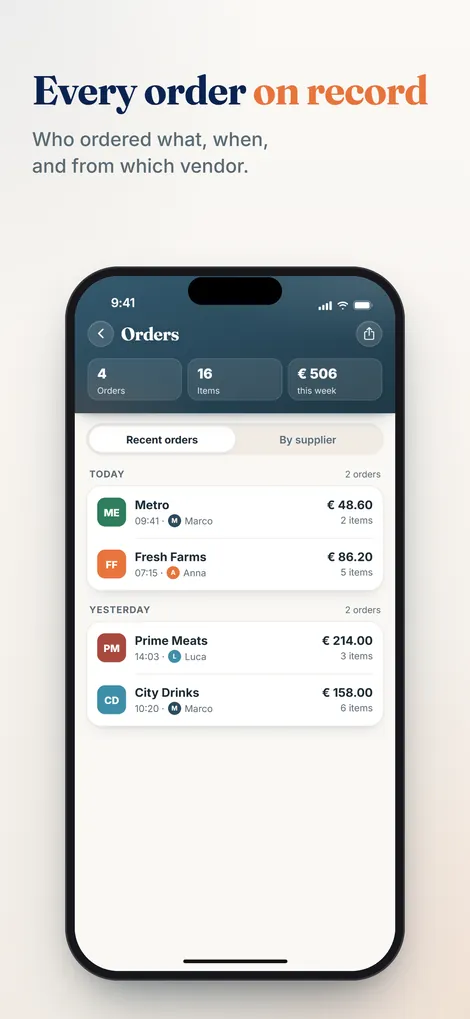
Pelican does not take orders from guests and is not connected to any delivery platform. It helps with the purchasing behind them. Whoever sees that food or packaging is running low adds it to the shared order list by voice or typing, in their own language. Pelican merges duplicate entries. The head chef approves the list. In the order history you later see what was ordered when and from which supplier, and if the team enters prices, what was spent. That is the basis for controlling food cost.
Pelican is not a POS system, not a guest ordering system and not stock accounting, and it does not place orders with suppliers itself. You still order the usual way, with the rep, on the phone or at the cash and carry.
Pelican is billed per business, not per user: Solo 19 euros per month (up to 3 users), Basic 29 euros per month (up to 5 users), Pro 59 euros per month (unlimited users). Paid yearly it is 15, 24 or 49 euros per month. Every plan starts with 30 days free.
Frequently asked questions
What is the difference between a ghost kitchen, a dark kitchen and a cloud kitchen?
There is none. All three mean a kitchen without a dining room that cooks only for delivery and pickup. Which term people use depends on the country. Ghost kitchen is the usual term in the US, dark kitchen in the UK.
What is a virtual brand?
A restaurant brand that exists only in the app or online, with no storefront of its own. One kitchen can run several virtual brands. An existing restaurant can also deliver under a second name.
Is a ghost kitchen profitable?
That depends on what you keep per order and how many orders you reach. In the example above, $10.50 is left from $30 after commission, food cost and packaging. With $8,400 in fixed costs a month you need 800 orders before there is a profit.
Do I need a license for a ghost kitchen?
You need what every food business needs. In the US that is a permit from your local health department. In the UK you register with your local authority at least 28 days before trading. Zoning and building rules come on top, so check both before you sign a lease.
How much commission do delivery platforms charge?
That is in your contract and depends on the country, the platform and the plan. One example: Uber Eats lists 20% to 30% for restaurants in the US when Uber delivers, and 15% for self-delivery (as of November 2026).
Can I run a ghost kitchen out of my restaurant?
Yes. A virtual brand out of your existing kitchen is the cheapest way in. Check first that the kitchen and crew still have capacity in the rush, and cost the delivery menu separately.
Several brands, one order list
Pelican collects what your team is missing in one order list, in every language your kitchen speaks. Try it free for 30 days. It does not take guest orders.
Create business and try 30 days free