 Pelican
Everything runs in your browser. Nothing is stored or sent anywhere.
Reorder point, safety stock and par level
Tuesday night in dry storage. The prep cook grabs the second to last jug of fryer oil, and the next truck from the distributor is Thursday at the earliest. Nobody knows if that is enough. The reorder point answers exactly that question: it tells you when to order, early enough that nothing runs out before the delivery shows up.
Four terms come up around reorder points, and kitchens and textbooks do not always use them the same way:
- Reorder point The quantity at which you reorder. Also called reorder level. It answers the question of when you order.
- Safety stock The buffer that absorbs swings in usage and in lead time. When everything runs normally, you never touch it.
- Minimum stock level In many textbooks another name for safety stock. In some kitchens people mean the reorder trigger instead. Agree on one meaning with your team.
- Maximum stock level The most you want on hand. Storage space, shelf life and the cash tied up in product set the limit.
The reorder point formula
Each part of the formula has a job:
- Daily usage Average usage on an open day. Use real numbers from invoices, order history or two counts with the deliveries in between, not a gut feeling.
- Lead time The open days from placing the order until the product is on the shelf. Order this afternoon, truck the morning after tomorrow: that is two days you cook with what is on the shelf right now.
- Safety stock The buffer on top. How to calculate it is in the next section.
Order quantity does not change the reorder point. Whether you order one case or three, the moment you need to order stays the same. Order quantity only decides how long it is until the next order.
How to calculate safety stock: three ways
There is no single correct safety stock formula. In practice you will run into three approaches:
| Method | Formula | Fits | Watch out for |
|---|---|---|---|
| Buffer days | Daily usage × buffer days, for example one day | most kitchen items, especially dry goods and beverages | check after two weeks whether you dipped into the buffer |
| Peak values | Peak daily usage × longest lead time minus average daily usage × normal lead time | shelf stable items you cannot run a service without | covers the worst case, so it comes out generous |
| Statistical formula | Service level factor × variation in usage × square root of lead time | warehouses with many items and clean data over a long period | rarely needed for a single kitchen |
For a kitchen, the first two methods are almost always enough. Buffer days for the bulk of your order guide, peak values for the few items where a shortage stops service: fryer oil, frozen fries, the flour for your house bread. The statistical formula from supply chain management needs many weeks of usage data that few kitchens track cleanly.
Two worked examples from the kitchen
The numbers below are examples to show the math. For your kitchen, only your own usage and lead times count.
Canola oil in 1 gallon jugs, with buffer days
A restaurant with a fryer goes through 2 gallons of canola oil per open day on average. The oil comes in cases of six 1 gallon jugs, and the distributor delivers two open days after the order. One day of usage is enough safety stock.
| Line | Math | Result |
|---|---|---|
| Usage during lead time | 2 gal × 2 days | 4 gal |
| Safety stock | 2 gal × 1 day | 2 gal |
| Reorder point | 4 gal + 2 gal | 6 gal |
| Trigger | 6 gal divided by 6 gal per case | 1 full case |
So the rule in dry storage is: once you are down to one full case, oil goes on the order. Order 2 cases, 12 gallons, and the kitchen uses 4 gallons before the truck arrives. 2 gallons are left, which is exactly your safety stock, and after the delivery there are 14 gallons on the shelf.
Frozen fries in 30 lb cases, with peak values
The same kitchen uses 40 lb of fries per open day on average and 60 lb on a packed Saturday. The frozen distributor normally delivers after two open days, but once the truck came a day late, after three.
| Line | Math | Result |
|---|---|---|
| Worst case | 60 lb × 3 days | 180 lb |
| Normal case | 40 lb × 2 days | 80 lb |
| Safety stock | 180 lb minus 80 lb | 100 lb |
| Reorder point | 80 lb + 100 lb | 180 lb |
| Trigger | 180 lb divided by 30 lb | 6 cases |
Compare that with one day of buffer: safety stock 40 lb, reorder point 120 lb, or 4 cases. Then three packed days at 60 lb each and a truck that takes three days add up to 180 lb. The 120 lb are gone after two days. Peak values keep you safe, at the price of more product in the walk-in freezer.
With frozen product that is a fair trade, because it keeps. Check first that 6 cases plus the new delivery actually fit in the freezer. If they do not, your maximum stock level is the limit, and you order more often in smaller amounts.
With fryer oil, full changes come on top of the daily top ups. How to turn that into a weekly oil order is shown in the guide on fryer oil management.
Reorder point or par level: which fits which item
Most kitchens run both systems side by side. Which one fits depends on how an item is delivered:
Reorder point
- order as soon as the trigger is hit, on any day
- for shelf stable product: oil, flour, rice, canned goods, frozen
- for beverages, chemicals and to go packaging
- the supplier delivers on demand, not on fixed days
Par level
- order on fixed days, filling up to par
- for perishables: produce, dairy, meat, seafood
- for everything the rep takes on fixed days
- safety stock is already built into the par
Many kitchens combine both. Perishables run on par levels with fixed delivery days, shelf stable product on reorder triggers in storage. How to calculate par is covered in its own guide with a calculator.
How much safety stock is too much
A big buffer feels safe, but it costs space, cash and, in the worst case, product. Five things cap it:
- Shelf life Safety stock should never be more than you use before it expires. For herbs, greens or fish with daily delivery, almost no buffer makes sense.
- Storage space Walk-in cooler, freezer and dry storage have hard limits. Reorder point plus delivery has to fit.
- Cash tied up Every case on the shelf is paid for but not yet sold. For expensive items like beef tenderloin or wine, a small buffer keeps your food costs in check.
- Importance Without fryer oil the line stops. Without the third kind of mustard it does not. Be generous only where a shortage stops service.
- Supplier and backup If your supplier is on time and a cash and carry is around the corner, a small buffer will do. If deliveries are unreliable or only once a week, you need more.
Make the reorder point visible in storage
A reorder point that only lives in a spreadsheet helps nobody. It has to be where people pull product. Four ways work well:
- A tag on the shelf A label at the spot: "Oil: reorder at 1 case". Whoever opens the last case sees the tag and puts oil on the list.
- Two bins Keep the product in two bins. When you start the second one, you reorder. Works well for spices, rice or sugar and needs no number at all.
- Reorder point on the order guide Next to every item on your order guide sits its reorder point. On the walk through, the chef sees at a glance what is due.
- Clear ownership Whoever drops below the reorder point says so right away, not at the end of the night. A note on the door rarely works, because it gets read too late.
How to set reorder points in six steps
This is how you get from "we notice when it is gone" to fixed triggers in storage.
- Pick your items. Start with the 20 to 30 shelf stable items that move all the time: oil, flour, rice, sugar, canned goods, frozen product, beverages, chemicals.
- Find real usage. From two to four weeks of invoices, order history or two counts with the deliveries in between. Divide by open days.
- Note lead time per supplier. The order cutoff and when the product is on your shelf, in open days. For unreliable suppliers, also the longest lead time.
- Choose your safety stock. One day of buffer for most items, peak values for the few you cannot run service without. Check against shelf life and storage space.
- Calculate and tag. Reorder point with the formula or the calculator above, rounded up to full cases, then onto a shelf tag or your order guide.
- Review after two weeks. Ran short? Raise the buffer. Buffer untouched? Lower it. Recalculate when the menu or the season changes.
Common reorder point mistakes
- Calendar days instead of open days The day off gets counted, usage and lead time are off, and the trigger sits too high.
- Forgetting lead time You order when the shelf is empty. Until the truck arrives, the kitchen cooks with nothing.
- One buffer for everything Three days of buffer for greens and for canned tomatoes. Half the greens end up in the trash, while more cans would never hurt.
- The trigger only lives in one head The chef knows when to reorder. On the chef's day off, nobody does.
- Never adjusting The menu changes, so does usage, but last year's tag is still on the shelf.
- Using the buffer without telling anyone Someone grabs the last case and says nothing. The safety stock is gone before anyone orders.
Where Pelican fits, and where it does not
Pelican helps at the moment someone sees the trigger. Whoever is standing at the shelf adds what is missing to the shared order list by voice or by typing, each in their own language. Pelican recognizes the product, merges duplicate entries and sorts the list by category. The chef approves it before the rep visit, and in supplier mode you check items off with the rep. Later the order history shows when what was ordered from which supplier, and so also how often an item was reordered.
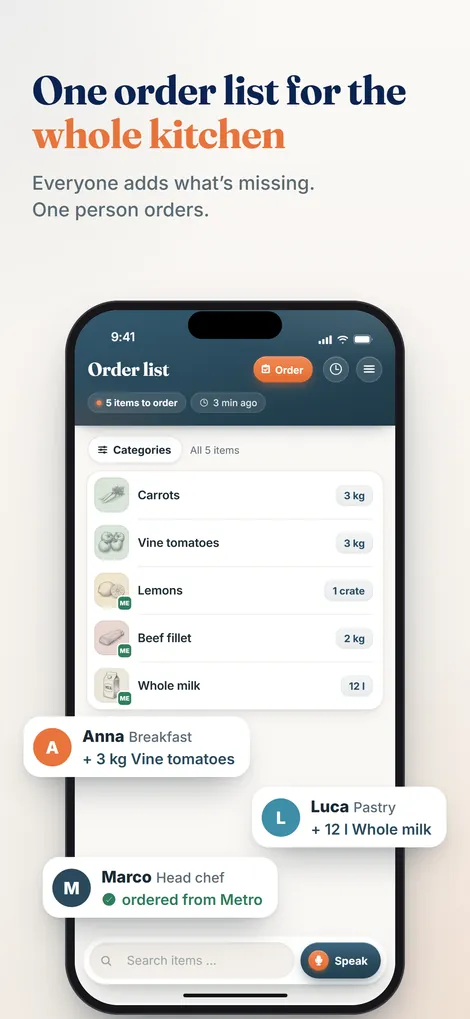
Pelican is not a POS, not a guest ordering system and not stock tracking, and it does not place orders with your supplier. You order the usual way, with the rep, by phone or at the cash and carry. Pelican does not know your stock levels, does not calculate reorder points and does not alert you automatically when one is hit. For that you need inventory software where every delivery and every withdrawal is recorded.
Frequently asked questions
How do you calculate a reorder point?
Reorder point = daily usage × lead time + safety stock. If you use 2 gallons of oil per open day, the distributor delivers after two days and you plan one day of buffer, that is 2 × 2 + 2 = 6 gallons. When your stock hits 6 gallons, you order.
What is the safety stock formula?
The simplest version is daily usage times buffer days, for example one day. For critical, shelf stable items you can use peak values: peak daily usage times longest lead time minus average daily usage times normal lead time. With 60 lb × 3 days minus 40 lb × 2 days, that is 100 lb.
What is the difference between safety stock and reorder point?
Safety stock is the buffer you normally never touch. The reorder point is higher: it is safety stock plus what you use while you wait for the delivery. You order at the reorder point, and the safety stock absorbs late trucks and busy days.
What is the difference between a reorder point and a par level?
The reorder point tells you when to order: as soon as the trigger is hit. The par level tells you how much to order up to on fixed order days. Perishables with fixed delivery days usually run on par, shelf stable product works well with reorder points.
Do perishables need a reorder point?
Usually not. Produce, dairy, meat and seafood often come daily or on fixed days and do not keep long. Order up to par on every delivery day instead and keep the buffer small so nothing spoils.
Can Pelican track reorder points?
No. Pelican does not know your stock levels and does not alert you when a trigger is hit. Pelican is the shared order list: whoever sees the trigger in storage adds the item by voice or by typing, and the chef approves the list before the rep visit. For automatic alerts you need inventory software.
See the trigger, add the item right away
Pelican collects what your team finds missing in storage on one order list, in every language spoken in your kitchen. The order history shows what was ordered from whom. Try it free for 30 days. The shelf tags are still yours to set.
Create business and try 30 days free