 Pelican
Quick answer: Choco or Pelican?
Choco and Pelican work at different points. Choco gets your order to the supplier. Pelican helps before that, turning what the whole team needs into one checked list. Which app you need depends on where your process breaks:
- You want to send orders to your suppliers straight from the app Use Choco. According to the vendor the app is free for restaurants, and the order reaches the supplier by email, text message, WhatsApp or integration.
- Five people report what is missing, in three languages Pelican helps. The team speaks or types what is needed into one shared list, and the head chef approves it.
- You order mostly with the rep, by phone or at the cash and carry Pelican is closer to how you work. The list is ready for the visit, and rep mode lets you check it off item by item.
- Both are true Combine the apps. Collect and approve in Pelican, then send the order in Choco to the suppliers you have added there.
Disclosure: how this comparison was made
Pelican is our own product. So here is what this comparison is based on: we did not run Choco with a test account and we give no scores or stars. Everything about Choco comes from what the vendor states on its website, its pricing page, in its help centre and in its app store listings, as of November 2026. If the vendor does not say it, it is not here.
Choco and Pelican compared: the table
The table sums up what the two vendors publish themselves. Details follow in the sections below.
| Feature | Choco | Pelican |
|---|---|---|
| What it is | Ordering app for restaurants: order from and chat with your own suppliers. The vendor also runs a platform for food wholesalers | Shared order list for the kitchen team |
| Cost | Free for restaurants, according to the vendor. Suppliers pay a monthly fee based on usage, amounts on request only | Solo €19, Basic €29, Pro €59 a month per business, or €15, €24 or €49 a month paid yearly, 30 days free |
| How you order | In the app. The order reaches the supplier in the format they prefer: email, text message, WhatsApp or integration | Pelican does not place orders: check the list off with the rep or send it as a PDF, by email or WhatsApp |
| Which suppliers | Suppliers you already work with, even if they are not signed up to Choco. Not a marketplace, according to the vendor | Any supplier. Pelican is not connected to any supplier, you pass the order on yourself |
| Capturing what is needed | Order guides you can sort by category or storage area, plus your suppliers' catalogues | The whole team speaks or types, each in their own language, duplicates are merged |
| In the team | Team order: one person starts it, another checks or edits it before it goes out. Roles and multiple locations | Everyone adds items, each entry shows who added it, the head chef approves the list |
| Overview | Delivery confirmation, delivery checks, chat with the supplier, purchasing reports on the web | Order history: what was ordered, when and from whom, with prices if you like |
| Languages | Multi-language options according to the vendor, the App Store listing gives English | App and voice input in 16 languages |
| Devices | iPhone, iPad, Android, browser | iPhone, iPad, Android |
When Choco is the better fit
With Choco you order from your suppliers and chat with them in one app. According to the vendor, Choco is not a marketplace: you order from suppliers you already work with, even if they are not signed up to Choco themselves. The order goes out in the format the supplier prefers, by email, text message, WhatsApp or through an integration. If you cannot find a supplier, the help centre says support will set them up for you.
Choco is free for restaurants, according to the vendor. Suppliers pay a monthly fee that depends on their usage. The pricing page shows no amounts, the quote comes from the sales team. There are apps for iPhone, iPad and Android and a browser version. The vendor lists order guides, team orders, roles for team members, multiple locations, delivery checks, purchasing reports on the web and round the clock support. Choco names Germany, Spain, France, the USA and the UK as its regions, and its legal notice gives Berlin as its base. Its homepage says more than 30,000 food merchants use Choco.
- You want to send the order from the app Choco sends it to the supplier. According to the vendor, orders carry product IDs, units, a delivery date and a delivery confirmation. Pelican sends nothing itself.
- You do not want to pay for an ordering app Choco is free for restaurants, according to the vendor. After 30 days Pelican costs from €19 a month, or from €15 paid yearly.
- You are a wholesaler yourself On its homepage Choco presents an AI platform for food wholesalers, with order capture, your own ordering shop and tools for the sales team. Pelican is not built for that.
When Pelican is the better fit
Pelican works before the order: the whole team adds what is missing by voice or typing, each person in their own language. Pelican recognises the item and quantity, sorts by category, merges duplicates and shows who added each entry.
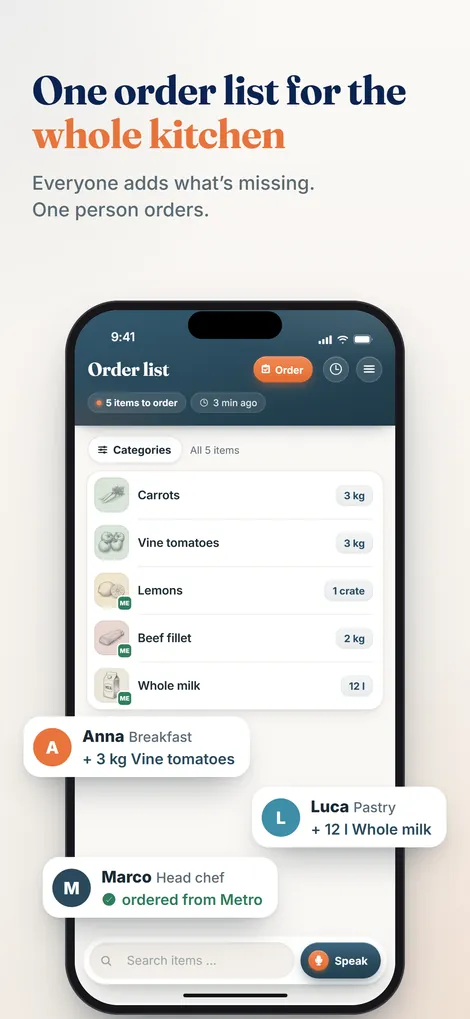
The head chef approves the list. When the rep visits, rep mode lets you check off item by item, with the price if you like. Without a visit, the list goes out as a PDF, by email or WhatsApp, split by supplier if you want. That works with any supplier, whatever system they use. The order history shows the owner what was ordered, when and from whom. Billing is per business, not per user; paid yearly it is €15, €24 or €49 a month. 30 days free.
- Several people report what is needed Breakfast, pastry and evening shifts add to the same list instead of scraps of paper and WhatsApp groups.
- Your team speaks several languages The app and voice input work in 16 languages, built for multilingual kitchen teams. The same product ends up as one entry on the list.
- You order with the rep, by phone or at the cash and carry There is nothing to send there, the list has to be ready for the visit. How to prepare for the rep's visit is covered in a separate guide.
What Pelican is not
So you can plan properly: Pelican does not replace an app that sends orders. You will not find these things in Pelican:
- No shop and no catalogues Pelican shows no product range and no price lists from your suppliers.
- No orders to suppliers Pelican sends nothing to suppliers automatically. You place the order, Pelican keeps track of what has been ordered.
- No stock bookings Pelican keeps no stock levels, no stocktakes and no recipes.
- Not a POS Tills, tables and guest bills are not part of Pelican.
- Not a guest ordering system Guests do not order through Pelican, and there is no QR code on the table.
Using Choco and Pelican together
The two apps do not rule each other out. Choco works where the order goes out, Pelican where the need comes up. To be honest, that also means you enter the approved items once more when you build the order in Choco. It is worth it when collecting from the team is your real problem. The work then splits like this:
Before the order: Pelican
- The team reports what is missing, by voice or typing
- Each person in their own language
- Duplicates are merged
- The head chef approves the list
Placing the order: Choco
- Send the order to the supplier from the app
- In the format the supplier prefers
- Chat with the supplier
- Delivery checks and purchasing reports
- Collect By the afternoon, every section adds what is missing in Pelican.
- Approve The head chef checks the list, deletes or adds items and approves it.
- Order For the suppliers you have added in Choco, you place the order there. With the rep you check off in rep mode, and everyone else gets the list as a PDF, by email or WhatsApp.
- Keep track In Pelican you mark what has been ordered. The team can see that nothing is ordered twice or not at all.
Frequently asked questions
Is Choco free for restaurants?
Yes. According to the vendor, Choco is free for restaurants, with no hidden fees. Suppliers pay a monthly fee that depends on their usage. The pricing page shows no amounts. Updated: November 2026.
Do my suppliers need to be on Choco?
No. According to the vendor you can order from all your suppliers, whether or not they are signed up to Choco. The order is converted into the format the supplier prefers, by email, text message, WhatsApp or integration. According to the help centre, Choco only connects businesses that already have a supplier relationship.
Which countries is Choco available in?
On its website Choco lists Germany, Spain, France, the USA and the UK as its regions. If you work in another country, it is best to ask the vendor directly whether you can order there. Updated: November 2026.
Is Pelican a Choco app alternative?
Only partly. Pelican does not send orders to suppliers and it has no catalogues. Pelican solves the step before: turning what the whole team needs into one checked list. If you order mostly with the rep, by phone or at the cash and carry, that may be all you need. If you want to send orders from an app, Choco is the right tool.
Can I use Choco and Pelican together?
Yes. The team collects what is needed in Pelican, the head chef approves the list, and for the suppliers you have added in Choco you place the order there. Everyone else gets the list as a PDF, by email or WhatsApp, or you check it off with the rep.
How much does Pelican cost?
Pelican is priced per business, not per user: Solo €19 (up to 3 users), Basic €29 (up to 5 users), Pro €59 (unlimited) a month, or €15, €24 or €49 a month paid yearly. You get 30 days free and can cancel at any time.
What other Choco alternatives are there?
For example Rekki, Orderlion, Gastivo, FoodNotify, MarketMan and Apicbase. What each app does and costs is covered in our guide to the best supplier ordering apps for restaurants. There is also a separate side by side comparison of Orderlion and Pelican.
Collect first, then order
Pelican brings what your whole team needs into one list, in every language of your kitchen, whether you then order through an app, with the rep or by phone. Try it free for 30 days.
Create business and try 30 days free