 Pelican
Short answer: Bring! or Pelican in the kitchen?
Bring! and Pelican are both shared lists, but they are built for different places. According to the provider, Bring! is meant for shopping at home, with roommates or for the office. Pelican is built for the kitchen team that orders from suppliers and reps. Which app you need depends on how your kitchen buys:
- There are two of you and you shop at the supermarket or cash and carry yourselves Then Bring! as a shared list is often enough for you. The core features are free according to the provider, and the list is sorted by category.
- Five people in three languages call out what's low Then Pelican helps. The team speaks or types what's needed into one shared list, and the head chef approves it.
- You order from the rep, by phone or by email Then Pelican is closer to how you work. The list is ready when the rep shows up, and in rep mode you check it off item by item.
- The owner wants to see what was ordered Then the order history in Pelican helps: what was ordered from whom and when, with prices if you want.
Disclosure: how we made this comparison
Pelican is our own product. That's why we spell out what this comparison is based on: we did not test Bring! in a working kitchen, and we don't give scores or stars. Everything about Bring! comes from what the provider publishes on its website, in its help center and in its app store listings, as of November 2026. If the provider doesn't say it, it isn't here.
Bring! vs Pelican: the comparison table
The table sums up what the two providers publish themselves. Details are in the sections below.
| Feature | Bring! | Pelican |
|---|---|---|
| What it is | Shopping list app for sharing, according to the provider for households, families, roommates and office purchases | Shared order list for the kitchen team |
| Cost | Free according to the provider, all core features at no charge. Google Play notes ads and in-app purchases | Solo €19, Basic €29, Pro €59 a month per business, or €15, €24 or €49 a month paid yearly, 30 days free |
| Adding items | Search with suggestions, item catalog, voice command, Siri and Alexa. Quantity, description and photo per item | The whole team speaks or types, each in their own language. Pelican recognizes item and quantity |
| As a team | Share lists, changes in real time, automatic notifications to list members | Everyone adds items, each entry shows who added it, duplicates are merged, the head chef approves the list |
| Organization | Sorted by category, order can match the store you shop at, labels by urgency, multiple lists, list templates | Sorted by product group, split by supplier if you want |
| Ordering and shopping | Check items off while shopping. Save the list as a PDF (Android) or send it (iPhone) | Pelican doesn't order for you: check the list off with the rep in rep mode, or send it as a PDF, by email or WhatsApp |
| Overview | Shopping suggestions based on how often you buy. According to the help center you can write prices into the description, they are not totaled | Order history: what was ordered from whom and when, with prices if you want |
| Extras | Recipes, flyers and deals from nearby stores, loyalty cards in the Bring! Wallet | Rep mode for the visit from your supplier's rep |
| Languages | 13 languages listed in the App Store. According to the help center the app language follows your phone language, and you pick the item catalog per list | App and voice input in 16 languages |
| Devices | iPhone, iPad, Android, Apple Watch, Android Wear, web app in beta | iPhone, iPad, Android |
When Bring! is the better fit
Bring! is a shopping list app for sharing. According to the provider it's meant for families and multi-person households, roommates and office purchases. You add items through search, the catalog or by voice command, also through Siri and Alexa, and add quantities, descriptions and photos. All list members see changes in real time, and there are automatic notifications. The list is sorted by category, and you can match the order to the store you shop at.
According to the provider you can download Bring! for free, and all core features such as creating and sharing lists are free of charge. Google Play notes that the app contains ads and in-app purchases. Bring! runs on iPhone, iPad, Android, Apple Watch and Android Wear, and there is a web app in beta. On top of that come recipes, flyers and deals from nearby stores. According to the imprint the provider is Bring! Labs AG in Zurich, and according to its homepage the app has 20 million users.
- You do the shopping yourselves The list is sorted by category and can follow the aisles of your supermarket. Whoever shops checks items off, and everyone else sees it right away.
- You don't want to pay for the list According to the provider the core features of Bring! are free. After 30 days Pelican costs from €19 a month, or from €15 paid yearly.
- The list is also for home or the office According to the provider Bring! is built for households, roommates and the office, with multiple lists for different stores and people. Pelican is only meant for the kitchen's orders.
When Pelican is the better fit
Pelican starts before the order: the whole team adds what's low by voice or by typing, each in their own language. Pelican recognizes item and quantity, sorts by product group, merges duplicates and shows who made each entry.
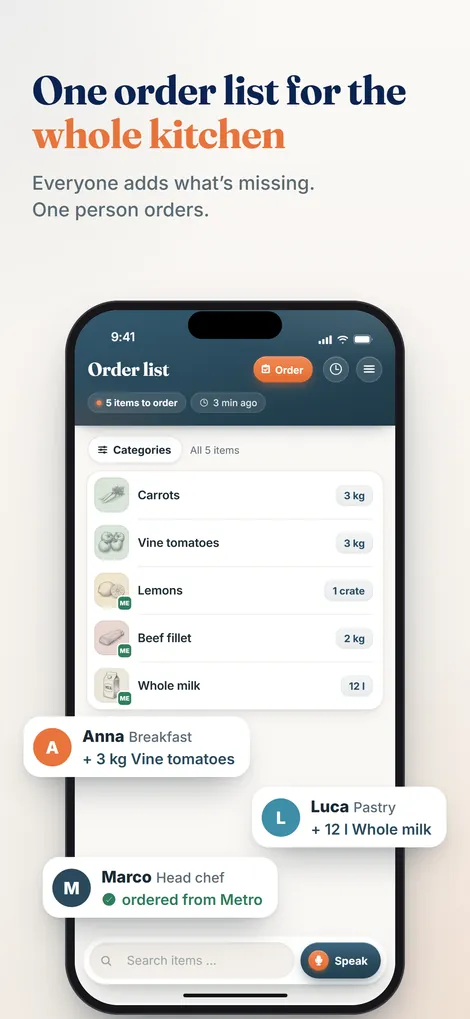
The head chef approves the list. When the rep visits, rep mode lets you check off item by item, with the price if you like. Without a visit, the list goes out as a PDF, by email or WhatsApp, split by supplier if you want. That works with any supplier, whatever system they use. The order history shows the owner what was ordered, when and from whom. Billing is per business, not per user; paid yearly it is €15, €24 or €49 a month. 30 days free.
- Several people report what's needed The morning shift, pastry and the night crew write on the same list instead of on scraps of paper and in WhatsApp groups. The head chef checks and approves before anything is ordered.
- Your team speaks several languages The app and voice input come in 16 languages, built for multilingual kitchen teams. The same product ends up as one entry on the list.
- You order from suppliers and reps The list has to be ready for the visit and go out split by supplier. How to prepare for the rep's visit is covered in its own guide.
What Pelican is not
So you can plan properly: Pelican is not a shopping list for home and doesn't replace an app that sends orders. You won't find these things in Pelican:
- No recipes, flyers or catalogs Pelican shows no recipes, no store deals and no price lists from your suppliers.
- No ordering from suppliers Pelican doesn't send anything to suppliers automatically. You place the order yourself, and Pelican keeps track of what was ordered.
- No inventory tracking Pelican doesn't track stock levels, inventory counts or recipes.
- No POS system Checkout, tables and guest billing don't run through Pelican.
- No guest ordering system Guests don't order through Pelican, and there's no QR code on the table.
Using Bring! and Pelican side by side?
That works, but the two apps are not connected. To be honest, that means anything that belongs on both lists has to be entered twice. A clear split makes sense: Pelican for everything ordered from suppliers, Bring! for what someone buys at the store:
Ordering from suppliers: Pelican
- The team reports what's low, by voice or typing
- Each in their own language
- The head chef approves the list
- Rep mode and order history
Your own shopping: Bring!
- Quick list for the supermarket or cash and carry
- Sorted by the aisles in the store
- Check off while you shop
- Lists for home or the office too
- Collect By the afternoon, every station adds what's low in Pelican.
- Approve The head chef checks the list, removes or adds items and approves it.
- Order With the rep you check items off in rep mode, all other suppliers get the list as a PDF, by email or WhatsApp. Whatever someone picks up at the store can go on a shared shopping list.
- Keep track In Pelican you mark what has been ordered. That way the team sees that nothing gets ordered twice or not at all.
Frequently asked questions
Is the Bring! app free?
According to the provider you can download Bring! for free, and all core features such as creating and sharing lists, recipes and deals are free of charge. Google Play notes that the app contains ads and in-app purchases. As of November 2026.
Can I use Bring! in a restaurant?
With Bring! you can share a list with your kitchen team too. According to the provider the app is meant for households, families, roommates and office purchases. Whether that's enough for your kitchen depends on how many people add items, whether someone should approve and whether you shop yourself or order from suppliers.
Which languages does the Bring! app support?
The App Store lists 13 languages. According to the help center the app language follows the language of your phone, and you can freely choose the item catalog for your lists. As of November 2026.
Is Pelican a Bring! app alternative?
For commercial kitchens yes, for households no. Pelican is the shared order list for the kitchen team: everyone adds items in their own language, the head chef approves, you check the list off with the rep, and the order history stays. Pelican is not meant for personal shopping or roommates.
Can I use Bring! and Pelican together?
Yes, but the apps are not connected. The best approach is a clear split: Pelican for everything ordered from suppliers and reps, Bring! for what someone buys at the store. That way you don't enter anything twice.
How much does Pelican cost?
Pelican is priced per business, not per user: Solo €19 (up to 3 users), Basic €29 (up to 5 users), Pro €59 (unlimited) a month, or €15, €24 or €49 a month paid yearly. You get 30 days free and can cancel at any time.
Which apps are built for restaurant ordering?
For example Choco, Rekki, Orderlion, Gastivo, FoodNotify, MarketMan and Apicbase. What each app does and costs is covered in the comparison of supplier ordering apps. There are also head-to-head comparisons of Choco and Pelican and of Orderlion and Pelican.
From shopping list to order list
Pelican brings what your whole team needs into one list, in every language of your kitchen, approved by the head chef and ready for the rep, the phone or the email. Try it free for 30 days.
Create business and try 30 days free